 Ari
7828089081
Ari
7828089081
* feat(compat): merge same-name subcommands under shared parent

When multiple server entries attach to the same parent and their cli.command
collides with a subcommand already in the parent tree, the incoming subcommand's
children are merged recursively into the existing one instead of producing a
duplicate sibling. Leaf-name collisions resolve first-wins.

Fixes the duplicate `group` / `message` rows in `dws chat --help` that surfaced
when bot capabilities were distributed across chat.group.members and
chat.message subtrees.

* feat(ir): carry FlagOverlay and ToolAnnotations into canonical catalog

FlagOverlay mirrors the per-parameter CLI overlay (alias, transform,
transformArgs, env default, default value, hidden) sourced from
market.CLIToolOverride.Flags.

ToolAnnotations mirrors MCP 2025+ tool annotations with nullable hints
(destructive / read-only / idempotent / open-world) so absence means
"unknown" rather than "false".

BuildCatalog now propagates both through the canonical layer, with tests
covering group metadata and flag-overlay passthrough.

* feat(output): add -f pretty for schema-aware colored output

dws schema now supports -f pretty alongside json / raw. Pretty mode
partitions output by product / tool / parameter / enum and applies ANSI
color so humans can browse the catalog without piping through jq.
json / raw behaviour is unchanged.

docs/reference.md gains a Schema Introspection section documenting
dws schema and the new pretty format.

* feat(skills): refresh 13-product references; add devdoc / drive / oa

SKILL.md cli_version bumped to >=1.0.15; product index reordered to match
the v1.0.15 command surface.

New references:
- devdoc.md: Open Platform documentation search
- drive.md: DingTalk drive (promoted out of Coming soon)
- oa.md: OA approval end-to-end flow

Major rewrites for aitable (dashboard / chart share, import/export,
attachment flow), chat (bot capabilities merged into chat.message and
chat.group.members), calendar (event suggest / attachments), doc (comment
subtree, file create, upload/download flow), and minutes (list
mine/shared/all unified, record subcommands split).

Minor alignment touch-ups for contact / report / todo flag names.

* docs(release): sync v1.0.15 notes — 159 commands across 13 products

README Key Services fully refreshed: chat 23, calendar 14, aitable 41,
doc 21, minutes 19; drive promoted out of Coming soon; workbench and
standalone bot rows removed; Quick Start expanded to 7 examples spanning
doc / minutes / drive; Coming soon trimmed to mail / conference / aiapp /
live / wiki.

Adds docs/command-index.md, an auto-generated English listing of all 159
runtime commands with description and when-to-use guidance aimed at AI
agents. Replaces the ad-hoc command-index.pre.* / command-index.full.*
snapshots used during development.

CHANGELOG 1.0.15 records the compat subcommand-merging feature, the new
command index, and a flag-naming cleanup across chat / calendar / drive /
minutes / contact / devdoc.
20 KiB
DingTalk Workspace CLI (dws)
dws — 钉钉工作台命令行工具,为人类和 AI Agent 而生。




Important
共创阶段:本项目涉及钉钉企业数据访问,需企业管理员授权后方可使用。欢迎加入钉钉 DWS 共创群获取支持与最新动态。详见下方 开始使用。

为什么选择 dws?
- 为人类而设计 —
--help查看用法,--dry-run预览请求,-f table/json/raw切换格式。 - 为 AI Agent 而设计 — 结构化 JSON 响应 + 内置 Agent Skills,开箱即用。
- 为企业管理员而设计 — 零信任架构:OAuth 设备流认证 + 域名白名单 + 权限最小化。没有一个字节能绕过安全鉴权和审计。
安装
macOS / Linux:
curl -fsSL https://raw.githubusercontent.com/DingTalk-Real-AI/dingtalk-workspace-cli/main/scripts/install.sh | sh
Windows(PowerShell):
irm https://raw.githubusercontent.com/DingTalk-Real-AI/dingtalk-workspace-cli/main/scripts/install.ps1 | iex
其他安装方式
npm(需要 Node.js(npm/npx)):
npm install -g dingtalk-workspace-cli
预编译二进制文件:从 GitHub Releases 下载。
macOS 用户注意:如果提示“无法打开,因为 Apple 无法检查其是否包含恶意软件”,请执行:
xattr -d com.apple.quarantine /path/to/dws
从源码构建:
git clone https://github.com/DingTalk-Real-AI/dingtalk-workspace-cli.git
cd dingtalk-workspace-cli
go build -o dws ./cmd       # 编译到当前目录
cp dws ~/.local/bin/         # 安装到 PATH
需要 Go 1.25+。也可以用
make package构建所有平台产物(macOS / Linux / Windows × amd64 / arm64)。
升级
需要 v1.0.7 及以上版本。更早版本请重新执行安装脚本进行升级。
dws 内置自升级能力,直接从 GitHub Releases 拉取更新,支持 SHA256 完整性校验和自动备份。
dws upgrade                    # 交互式升级到最新版本
dws upgrade --check            # 仅检查是否有新版本
dws upgrade --list             # 列出所有可用版本
dws upgrade --version v1.0.7   # 升级到指定版本
dws upgrade --rollback         # 回滚到上一版本
dws upgrade -y                 # 跳过确认直接升级
工作原理
升级过程采用两阶段原子流程,确保一致性:
- 准备阶段 — 将平台对应的二进制文件和技能包下载到临时目录,校验 SHA256 校验和,解压并验证所有文件。任何步骤失败则立即中止,不会修改现有安装。
- 执行阶段 — 仅在所有准备工作成功后,替换二进制文件并将技能包安装到所有已检测到的 Agent 目录(
~/.agents/skills/dws、~/.claude/skills/dws、~/.cursor/skills/dws等)。
每次升级前自动备份当前版本,可通过 dws upgrade --rollback 随时回滚。
| Flag | 说明 |
|---|---|
--check |
仅检查更新,不安装 |
--list |
列出所有可用版本及更新日志 |
--version |
升级到指定版本(如 v1.0.7) |
--rollback |
回滚到上一个备份版本 |
--force |
强制重新安装,即使已是最新版本 |
--skip-skills |
跳过技能包更新 |
-y |
跳过确认提示 |
开始使用
dws auth login            # 自动唤起浏览器
dws auth login --device   # 无浏览器环境(Docker、SSH、CI)
选择组织并授权即可。
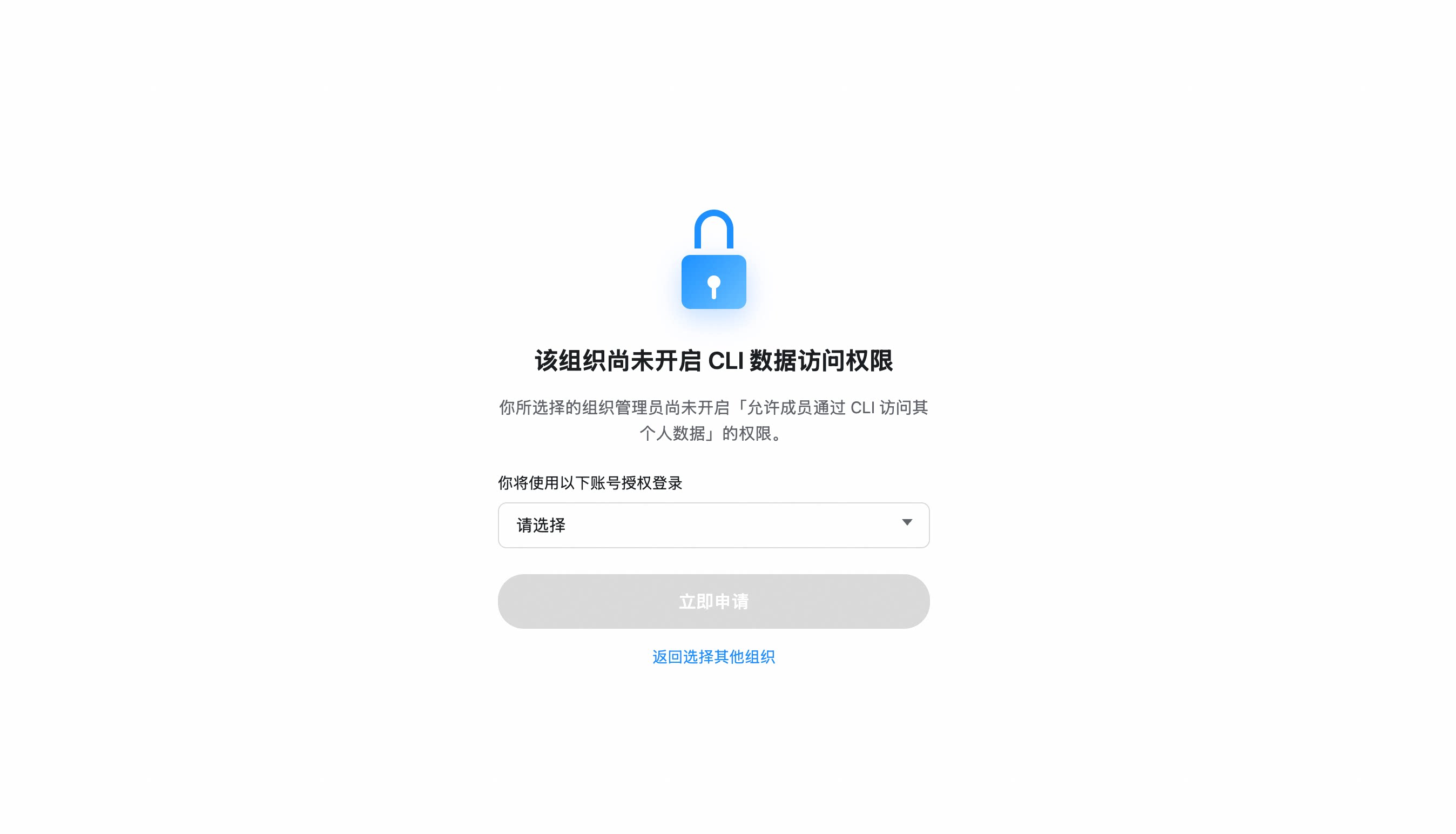
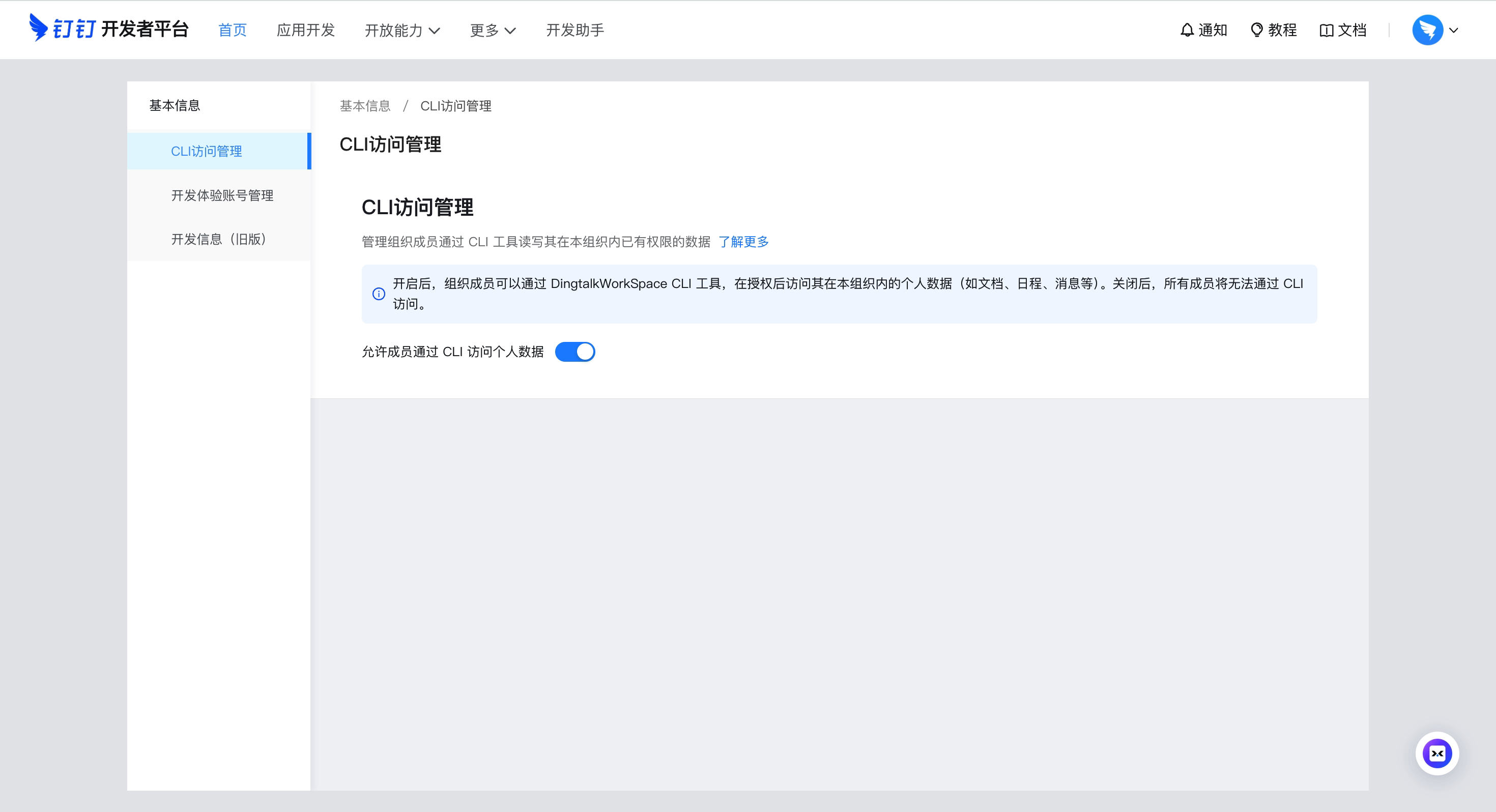
如果组织尚未开启 CLI 访问权限,系统会引导你向管理员发送申请。审批通过后重新执行
dws auth login即可。
组织未开启 CLI 访问权限?
- 选择组织后,点击「立即申请」通知管理员
- 管理员收到申请卡片,一键审批
- 审批通过后,重新执行
dws auth login
自建应用模式(CI/CD、ISV 集成)
企业自主管控场景,可创建自有钉钉应用:
- 开放平台应用开发后台 → 创建应用
- 安全设置 → 添加重定向 URL:
http://127.0.0.1,https://login.dingtalk.com - 发布应用
- 登录:
dws auth login --client-id <your-app-key> --client-secret <your-app-secret>
首次登录后凭证安全存储(Keychain),后续自动刷新 Token。
快速开始
dws contact user search --query "悟空"             # 搜索联系人
dws calendar event list                            # 查看今天的日程
dws doc search --query "季度"                      # 搜索钉钉文档
dws minutes list mine                              # 列出我创建的 AI 听记
dws drive list                                     # 列出钉盘文件
dws todo task create --title "季度汇报" --executors "<your-userId>"   # 创建待办(请替换为真实 userId)
dws todo task list --dry-run                       # 预览操作但不执行
完整命令列表:
docs/command-index.md— 全部 159 条命令,带描述和使用场景。
在 Agent 中使用
dws 是为 AI Agent 设计的 CLI 工具。请先完成安装和开始使用,然后配置 Agent 环境:
Agent 调用模式
# 使用 --yes 跳过确认提示(Agent 必须)
dws todo task create --title "Review PR" --executors "<your-userId>" --yes

# 使用 --dry-run 预览操作(安全执行)
dws contact user search --keyword "张三" --dry-run

# 使用 --jq 精确提取(节省 token)
dws contact user get-self --jq '.result[0].orgEmployeeModel | {name: .orgUserName, dept: .depts[0].deptName, userId}'
Schema 发现
Agent 无需预置所有命令知识,通过 dws schema 动态发现可用能力:
# 第一步:发现所有可用产品
dws schema --jq '.products[] | {id, tool_count: (.tools | length)}'

# 第二步:查看目标工具的参数结构
dws schema aitable.query_records --jq '.tool.parameters'

# 第三步:构造正确的调用
dws aitable record query --base-id BASE_ID --table-id TABLE_ID --limit 10
Agent Skills
仓库内置完整的 Agent Skill 体系(skills/),安装后 Claude Code / Cursor 等 AI 工具可通过自然语言直接操作钉钉:
# 安装 skills 到当前项目
curl -fsSL https://raw.githubusercontent.com/DingTalk-Real-AI/dingtalk-workspace-cli/main/scripts/install-skills.sh | sh
install.sh安装到$HOME/.agents/skills/dws(全局);install-skills.sh安装到./.agents/skills/dws(当前项目)。
包含内容:
| 组件 | 路径 | 说明 |
|---|---|---|
| 主 Skill | SKILL.md |
意图路由、决策树、安全规则、错误处理 |
| 产品参考 | references/products/*.md |
各产品命令详细参考(aitable、chat、calendar 等) |
| 意图指南 | references/intent-guide.md |
易混淆场景消歧(如 report vs todo) |
| 全局参考 | references/global-reference.md |
认证、输出格式、全局 flag |
| 错误码 | references/error-codes.md |
错误码 + 调试流程 |
| Recovery 指南 | references/recovery-guide.md |
RECOVERY_EVENT_ID 处理 |
| 现成脚本 | scripts/*.py |
13 个批量操作脚本(见下方) |
现成脚本 — 13 个 Python 脚本,覆盖常见多步工作流
| 脚本 | 说明 |
|---|---|
calendar_schedule_meeting.py |
一键创建日程 + 添加参与者 + 搜索并预定空闲会议室 |
calendar_free_slot_finder.py |
查询多人共同空闲时段,推荐最佳会议时间 |
calendar_today_agenda.py |
查看今天/明天/本周的日程安排 |
import_records.py |
从 CSV/JSON 批量导入记录到 AI 表格 |
bulk_add_fields.py |
批量添加字段到 AI 表格数据表 |
upload_attachment.py |
上传附件到 AI 表格 attachment 字段 |
todo_batch_create.py |
从 JSON 文件批量创建待办(含优先级、截止时间、执行者) |
todo_daily_summary.py |
汇总今天/本周未完成的待办 |
todo_overdue_check.py |
扫描已过截止时间但未完成的待办,输出逾期清单 |
contact_dept_members.py |
按部门名称搜索并列出所有成员 |
attendance_my_record.py |
查看我今天/本周/指定日期的考勤记录 |
attendance_team_shift.py |
查询团队成员本周排班和出勤统计 |
report_inbox_today.py |
查看今天收到的日志列表及详情 |
ISV 集成:编写您自己的 Agent Skill,与 dws 内置 Skill 搭配构建跨产品工作流:ISV Skill → dws Skill → 钉钉开放平台 API(强制鉴权 + 全链路审计)。
功能特性
智能输入纠错 — 自动修正 AI 模型常见的参数错误
内置 Pipeline 纠错引擎,支持命名风格转换、粘连参数拆分、拼写模糊匹配:
# 命名风格自动转换 (camelCase / snake_case / UPPER → kebab-case)
dws aitable record query --baseId BASE_ID --tableId TABLE_ID         # 自动纠正为 --base-id --table-id

# 粘连参数自动拆分
dws contact user search --keyword "张三" --timeout30                  # 自动拆分为 --timeout 30

# 拼写错误模糊匹配
dws aitable record query --base-id BASE_ID --tabel-id TABLE_ID       # --tabel-id → --table-id

# 参数值归一化 (布尔 / 数字 / 日期 / 枚举)
# "yes" → true, "1,000" → 1000, "2024/03/29" → "2024-03-29", "ACTIVE" → "active"
| Agent 输出 | dws 自动纠正为 |
|---|---|
--userId |
--user-id |
--limit100 |
--limit 100 |
--tabel-id |
--table-id |
--USER-ID |
--user-id |
--user_name |
--user-name |
jq 过滤 & 字段筛选 — 精确控制输出,减少 token 消耗
# 内置 jq 表达式
dws aitable record query --base-id BASE_ID --table-id TABLE_ID --jq '.invocation.params'
dws schema --jq '.products[] | {id, tools: (.tools | length)}'

# 只返回指定字段
dws aitable record query --base-id BASE_ID --table-id TABLE_ID --fields invocation,response
Schema 自省 — 调用前查询任意工具的参数结构
dws schema                                              # 列出所有产品和工具
dws schema aitable.query_records                        # 查看参数 Schema
dws schema aitable.query_records --jq '.tool.required'   # 查看必填字段
dws schema --jq '.products[].id'                        # 提取所有产品 ID
管道 & 文件输入 — 从文件或 stdin 读取 flag 值
# 从文件读取消息内容
dws chat message send-by-bot --robot-code BOT_CODE --group GROUP_ID \
  --title "周报" --text @report.md

# 通过管道传入内容
cat report.md | dws chat message send-by-bot --robot-code BOT_CODE --group GROUP_ID \
  --title "周报"

# 显式从 stdin 读取
dws chat message send-by-bot --robot-code BOT_CODE --group GROUP_ID \
  --title "周报" --text @-
核心服务
| 服务 | 命令 | 命令数 | 子命令 | 描述 |
|---|---|---|---|---|
| 通讯录 | contact |
6 | user dept |
按姓名/手机号搜索、批量查询、部门树、当前用户信息 |
| 群聊 | chat(别名 im) |
23 | message group bot conversation-info search search-common list-top-conversations |
消息(发送 / 列表 / list-all / 按发送者 / @我 / 关注 / 未读 / 话题回复 / 搜索)、群增删改 + 成员管理(含 add-bot)、机器人身份消息(send-by-bot / recall-by-bot / send-by-webhook)、会话信息查询、共同群聊 |
| 日历 | calendar |
14 | event room participant busy |
日程 CRUD + 建议时间 + 附件、会议室预订、闲忙查询、参与者管理 |
| 待办 | todo |
6 | task |
创建、列表、修改、完成、详情、删除 |
| 审批 | oa |
9 | approval |
同意 / 拒绝 / 撤销、待我审批 / 我发起的、流程列表、操作记录 |
| 考勤 | attendance |
4 | record shift summary rules |
打卡记录、排班查询、考勤摘要、考勤组规则 |
| DING | ding |
2 | message |
发送 / 撤回 DING 消息 |
| 日志 | report |
7 | create list detail template stats sent |
创建日志、收发列表、模版、详情、统计 |
| AI 表格 | aitable |
41 | base table record field view dashboard chart import export attachment template |
Base / 数据表 / 记录 / 字段 / 视图 全量 CRUD;图表 + 仪表盘(含分享配置);数据导入导出;附件;模板 |
| 文档 | doc |
21 | search list info read create update upload download copy move rename file folder block comment |
搜索 / 读写文档、文件与文件夹创建、块级编辑、评论(list / create / reply / create-inline)、上传 / 下载 |
| 钉盘 | drive |
6 | list info download mkdir upload-info commit |
钉盘文件操作:列表、详情、下载、创建文件夹、两阶段上传 |
| AI 听记 | minutes |
19 | list get update mind-graph speaker hot-word upload |
听记列表(我创建 / 共享给我)、详情(info / summary / keywords / transcription / todos / batch)、标题/摘要更新、思维导图、发言人替换、热词、上传会话 |
| 开发者文档 | devdoc |
1 | article |
搜索钉钉开放平台文档 |
13 个产品,159 条命令。 完整命令清单(带描述与使用场景):
docs/command-index.md。运行dws --help查看顶层命令树,或dws <service> --help查看子命令。
关于
chat bot:机器人能力(send-by-bot/recall-by-bot/add-bot/send-by-webhook/ bot 搜索)已合并到对应的chat子树下(例如dws chat message send-by-bot、dws chat group members add-bot),保持 agent 视角下的命令面扁平易发现。不再有独立的顶层bot产品。
即将推出
mail(邮箱)· conference(视频会议)· aiapp(AI 应用)· live(直播)· wiki(知识库)
安全设计
dws 从架构层面将安全作为一等公民,而非事后补丁。凭证不落盘、Token 不出域、权限不越界、操作不脱审 — 每一次 API 调用都必须经过钉钉开放平台的鉴权和审计链路,无例外。
开发者安全机制
| 机制 | 说明 |
|---|---|
| Token 加密存储 | PBKDF2(600,000 次迭代 + SHA-256)+ AES-256-GCM 加密,密钥绑定设备物理 MAC 地址;macOS 集成系统 Keychain、Windows 集成 DPAPI 提供额外保护,跨设备无法解密 |
| 输入安全防护 | 路径遍历防护(符号链接解析 + 工作目录约束)、CRLF 注入拦截、Unicode 视觉欺骗字符过滤,防止 AI Agent 被恶意指令诱导 |
| 域名白名单 | DWS_TRUSTED_DOMAINS 默认仅信任 *.dingtalk.com,Bearer Token 不会发送到非白名单域 |
| 并发安全 | 双层锁机制(进程内 + 跨进程文件锁)保障 Token 刷新原子性,适配高并发 MCP Server 场景 |
| 数据完整性 | 所有配置写入采用原子操作(temp + fsync + rename),确保进程中断时数据不损坏 |
| HTTPS 强制 | 除 loopback 开发调试外,所有请求强制 TLS |
| Dry-run 预览 | --dry-run 展示调用参数但不执行,防止误操作生产数据 |
| 凭证零落盘 | Client ID / Secret 仅在内存中使用,不写入配置文件或日志 |
企业管理员安全机制
| 机制 | 说明 |
|---|---|
| OAuth 设备流认证 | 用户必须通过管理员授权的钉钉应用认证,未授权应用无法获取 Token |
| 权限最小化 | CLI 仅能调用管理员授予该应用的 API 权限范围,无法越权 |
| 白名单准入 | 共创阶段需管理员主动确认开通,后续支持自助审批 |
| 操作全链路审计 | 每一次数据读写都经过钉钉开放平台 API,企业管理员可在管理后台实时追溯完整调用日志,任何异常操作无处隐藏 |
ISV / 企业服务商安全机制
| 机制 | 说明 |
|---|---|
| 租户数据隔离 | 以已授权应用身份调用 API,不同租户数据严格隔离 |
| Skill 沙箱 | Agent Skills 是 Markdown 文档(SKILL.md),仅提供 prompt 描述,不执行任意代码 |
| 集成链路零盲区 | ISV Skill 与 dws Skill 联调时,每一次 API 调用都强制经过钉钉开放平台鉴权,完整调用链路可追溯,不存在绕过审计的旁路 |
发现安全漏洞?请通过 GitHub Security Advisories 报告,详见 SECURITY.md。
参考与文档
- 命令索引 — 159 条运行时命令,带描述与使用场景
- 参考手册 — 环境变量、退出码、输出格式、Shell 补全
- 架构设计 — 发现驱动管道、IR、Transport 层
- 更新日志 — 版本历史与迁移说明
贡献指南
参见 CONTRIBUTING.md 了解构建、测试和开发工作流。
许可证
Apache-2.0