 shangguanxuan633-labandshangguanxuan.sgx
725577103d
shangguanxuan633-labandshangguanxuan.sgx
725577103d
* feat: PAT scope error visualization and auto-retry with authorization polling

1. PAT error result visualization (non-JSON)
   - Human-readable error output matching lark-cli style
   - Shows error type, message, hint, and authorization command
   - JSON output also available via --format json

2. Auto-retry with polling after authorization wall
   - Detects missing_scope / insufficient_scope / permission errors
   - Polls every 5s for token update after user completes auth
   - 10 minute timeout before giving up
   - Automatically retries the original command after successful auth

Changes:
- internal/app/pat_auth_retry.go: Core PAT error handling and retry logic
- internal/app/pat_auth_retry_test.go: 11 unit tests
- internal/app/runner.go: Integration with executeInvocation error path
- internal/auth/device_flow.go: Add SetScope() method

* feat: migrate PAT (Permission Authorization) infrastructure to open-source core

Move PAT permission management code from dws-wukong overlay to the
open-source dingtalk-workspace-cli core. This enables PAT handling
in the public distribution while keeping dws-wukong fully compatible
through the edition.Hooks mechanism.

Changes:
- pkg/edition: add 6 new Hooks fields (AuthClientID, AuthClientFromMCP,
  SaveToken, LoadToken, DeleteToken, ClassifyToolResult) for overlay
  extensions to inject custom auth/token/error behaviour
- internal/errors/pat: new PATError type with ExitCode()=4 and
  RawStderr() for embedded-mode passthrough, plus ClassifyToolResultContent
  and ClassifyMCPResponseText classification functions
- internal/pat: new command group (pat chmod) with tool result handling
- internal/app/root: register PAT commands before RegisterExtraCommands hook
- internal/app/runner: integrate ClassifyToolResult hook in the
  callResult.IsError branch so overlays can intercept PAT/gateway errors
  before generic handling

The dws-wukong overlay remains unchanged — its existing pat/ package and
RegisterExtraCommands hook continue to work. Through the go.mod replace
directive and deduplicateCommands mechanism, both codebases coexist
without conflict.

* feat(pat): add PAT auth check with device flow polling and auto-retry

- Add ClassifyPatAuthCheck / AsPatAuthCheckError in pat.go for
  AGENT_CODE_NOT_EXISTS error detection
- Add handlePatAuthCheck in pat_auth_retry.go: inject clientId as
  x-robot-uid header, poll device flow endpoint, auto-retry on APPROVED
- Integrate PAT check into runner.go executeInvocation pipeline
  (edition hook + open-source fallback)
- Add patAuthRequiredCodes map for extensible auth-required code matching
- Remove test_parse.go (temporary test script)

* fix(pat): update poll path to /cli/oauth/device/poll and add x-user-access-token header

- Change DevicePollPath from /api/dingtalk-workspace-cli/oauth/device/poll
  to /cli/oauth/device/poll (aligning with backend endpoint convention)
- Add x-user-access-token header to poll requests (loaded from stored token)

* feat(auth): PAT device flow improvements and flowId empty guard

- pat_auth_retry: fix JSON field parsing (result -> data) using DevicePollResponse
- pat_auth_retry: fix elapsed time calculation based on start timestamp
- device_flow: add flowId empty guard - skip polling and show auth URL for manual handling
- device_flow: unify terminalBaseURL to GetMCPBaseURL for polling endpoint
- device_flow: remove unused PollFlowApproval dead code
- runner: integrate DWS_CLIENT_ID env and app.json persistence
- oauth_provider: add x-robot-uid header removal on logout
- client: add request/response logging for transport debugging

* feat(env): switch all service discovery URLs from pre-release to production

- endpoints: pre-login/pre-api/pre-mcp/pre-open-dev -> login/api/mcp/open-dev
- loader: DefaultMarketBaseURL -> mcp.dingtalk.com
- registry: defaultBaseURL -> mcp.dingtalk.com
- constants: DefaultTerminalBaseURL -> open-dev.dingtalk.com

* fix: remove residual merge conflict markers and duplicate Hooks fields in edition.go; unify developer-settings URL via config helper in device_flow.go

* chore: remove lark-cli reference from PrintPatAuthError comment

* test: add comprehensive unit tests for PAT auth modules

- Create internal/errors/pat_test.go (38 tests): covers ClassifyToolResultContent,
  ClassifyMCPResponseText, ClassifyPatAuthCheck, AsPatAuthCheckError, cleanPATJSON,
  stripClassFields, getDWSGatewayErrorCode, isNotLoggedInError, isBusinessError,
  IsPATError, IsPATNoPermissionCode, suggestForBusinessErrorText
- Supplement pat_auth_retry_test.go (+7 tests): IsPatRetrying context checks,
  pollPatDeviceFlow edge cases (server error fallback, SSO redirect skip),
  extractPatScopeError nil/identity extraction

* feat(pat): exchange authCode for fresh token after PAT APPROVED

Previously pollPatDeviceFlow discarded the authCode from the poll
response, so handlePatAuthCheck retried with the stale token after
APPROVED. This mirrors device_flow.go loginOnce which calls
exchangeCode → SaveTokenData.

Changes:
- pollPatDeviceFlow: return (status, authCode, error) instead of
  (status, error); extract Data.AuthCode on APPROVED
- handlePatAuthCheck APPROVED path: call ExchangeCodeForToken +
  SaveTokenData before ResetRuntimeTokenCache, with graceful
  fallback on exchange failure
- Update all 6 poll test cases for new 3-return signature; add
  authCode assertions for APPROVED/REJECTED/EXPIRED/CANCELLED/
  ServerError scenarios

* fix(pat): CR round-2 must-fix items

- scopeValueRegex: support multi-segment scopes (mail:a.b:send)
  Updated regex to ([a-zA-Z][a-zA-Z0-9_.]*(?::[a-zA-Z][a-zA-Z0-9_.]*)+)

- handlePatAuthCheck: add 3 integration tests (APPROVED/REJECTED/EmptyFlowID)
  Covers the 132-line main orchestrator with mock runner + httptest server

- Extract ParseDeviceFlowStatus + status constants to auth package
  Eliminates string literal duplication across device_flow.go and pat_auth_retry.go

* fix(pat): use direct OAuth path when clientSecret is provided

When PAT error response includes both clientId and clientSecret,
use SetClientID() (direct DingTalk API mode) instead of
SetClientIDFromMCP() (MCP proxy mode). The MCP proxy does not
hold the secret for the PAT-assigned app, causing HTTP 400
'invalidParameter.idOrSecret.notFound' on token exchange.

Now: clientSecret present → direct mode; absent → MCP proxy mode.

---------

Co-authored-by: shangguanxuan.sgx <shangguanxuan.sgx@alibaba-inc.com>
DingTalk Workspace CLI (dws)
dws — DingTalk Workspace on the command line, built for humans and AI agents.




中文版 · English · Reference · Changelog
Important
Co-creation Phase: This project accesses DingTalk enterprise data and requires enterprise admin authorization. Join the DingTalk DWS co-creation group for support and updates. See Getting Started below.

Table of Contents
Why dws?
- For humans —
--helpfor usage,--dry-runto preview requests,-f table/json/rawfor output formats. - For AI agents — structured JSON responses + built-in Agent Skills, ready out of the box.
- For enterprise admins — zero-trust architecture: OAuth device-flow auth + domain allowlisting + least-privilege scoping. Not a single byte can bypass authentication and audit.
Installation
macOS / Linux:
curl -fsSL https://raw.githubusercontent.com/DingTalk-Real-AI/dingtalk-workspace-cli/main/scripts/install.sh | sh
Windows (PowerShell):
irm https://raw.githubusercontent.com/DingTalk-Real-AI/dingtalk-workspace-cli/main/scripts/install.ps1 | iex
Other install methods
npm (requires Node.js (npm/npx)):
npm install -g dingtalk-workspace-cli
Pre-built binary: download from GitHub Releases.
macOS users: If you see "cannot be opened because Apple cannot check it for malicious software", run:
xattr -d com.apple.quarantine /path/to/dws
Build from source:
git clone https://github.com/DingTalk-Real-AI/dingtalk-workspace-cli.git
cd dingtalk-workspace-cli
go build -o dws ./cmd       # build to current directory
cp dws ~/.local/bin/         # install to PATH
Requires Go 1.25+. Use
make packageto cross-compile for all platforms (macOS / Linux / Windows x amd64 / arm64).
Upgrade
Requires v1.0.7 or later. For earlier versions, please re-run the install script to upgrade.
dws has built-in self-upgrade capability. Updates are pulled directly from GitHub Releases with SHA256 integrity verification and automatic backup.
dws upgrade                    # interactive upgrade to latest version
dws upgrade --check            # check for new versions without installing
dws upgrade --list             # list all available versions
dws upgrade --version v1.0.7   # upgrade to a specific version
dws upgrade --rollback         # rollback to the previous version
dws upgrade -y                 # skip confirmation prompt
How it works
The upgrade process follows a two-phase atomic flow to ensure consistency:
- Prepare — downloads the platform-specific binary and skill packages to a temporary directory, verifies SHA256 checksums, and extracts/validates all files. If any step fails, the upgrade aborts without modifying the existing installation.
- Apply — only after all preparations succeed, the binary is replaced and skill packages are installed to all detected agent directories (
~/.agents/skills/dws,~/.claude/skills/dws,~/.cursor/skills/dws, etc.).
A backup of the current version is automatically created before each upgrade. Use dws upgrade --rollback to restore the previous version if needed.
| Flag | Description |
|---|---|
--check |
Check for updates without installing |
--list |
List all available versions with changelogs |
--version |
Upgrade to a specific version (e.g. v1.0.7) |
--rollback |
Rollback to the previous backed-up version |
--force |
Force reinstall even if already on the latest version |
--skip-skills |
Skip skill package update |
-y |
Skip confirmation prompt |
Getting Started
dws auth login            # browser opens automatically
dws auth login --device   # for headless environments (Docker, SSH, CI)
Select your organization and authorize. That's it.
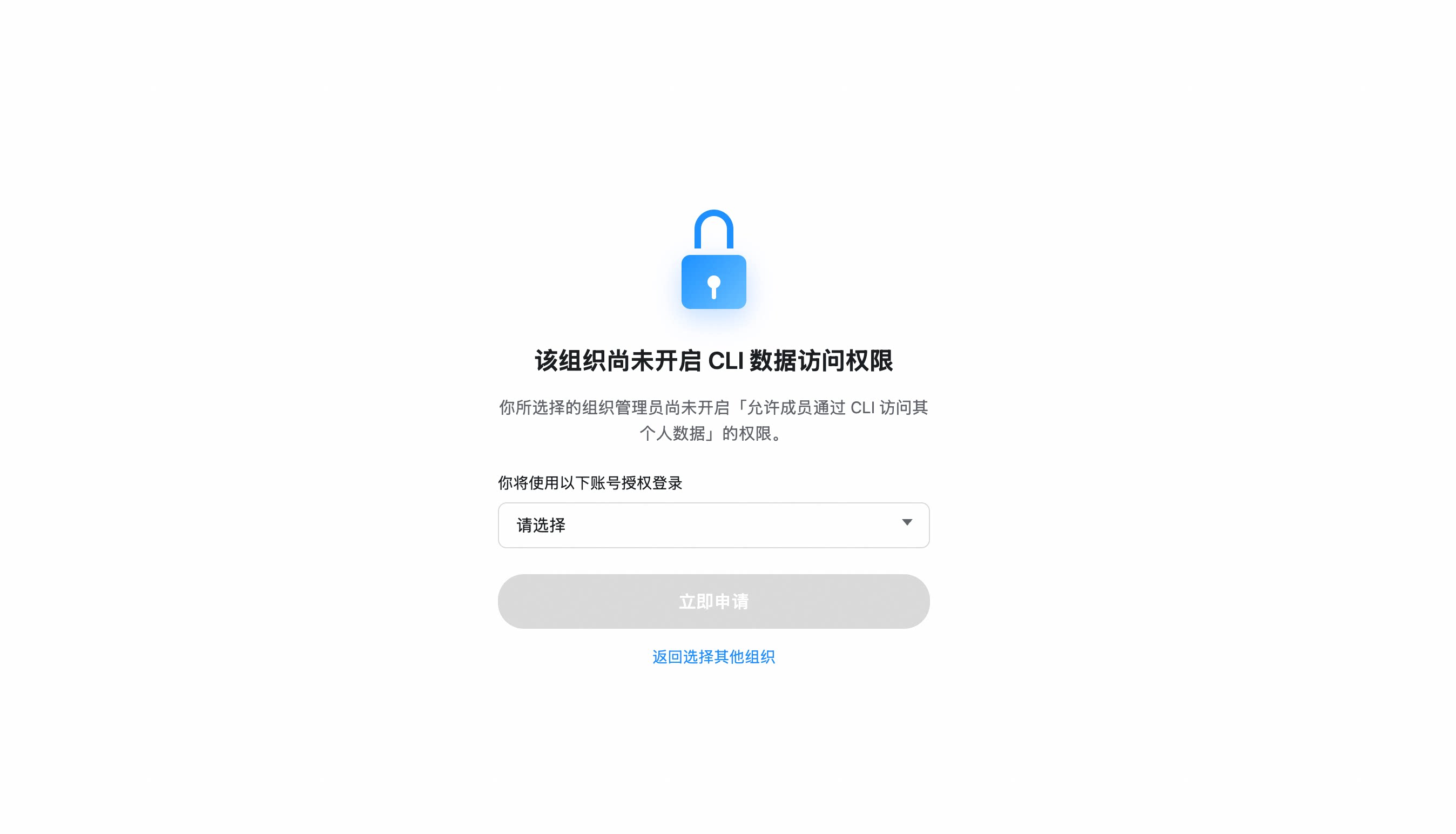
If your organization hasn't enabled CLI access, you'll be prompted to send an access request to your admin. Once approved, re-run
dws auth login.
Organization hasn't enabled CLI access?
- After selecting your organization, click "Apply Now" to notify the admin
- The admin receives a request card and can approve with one click
- Once approved, re-run
dws auth login
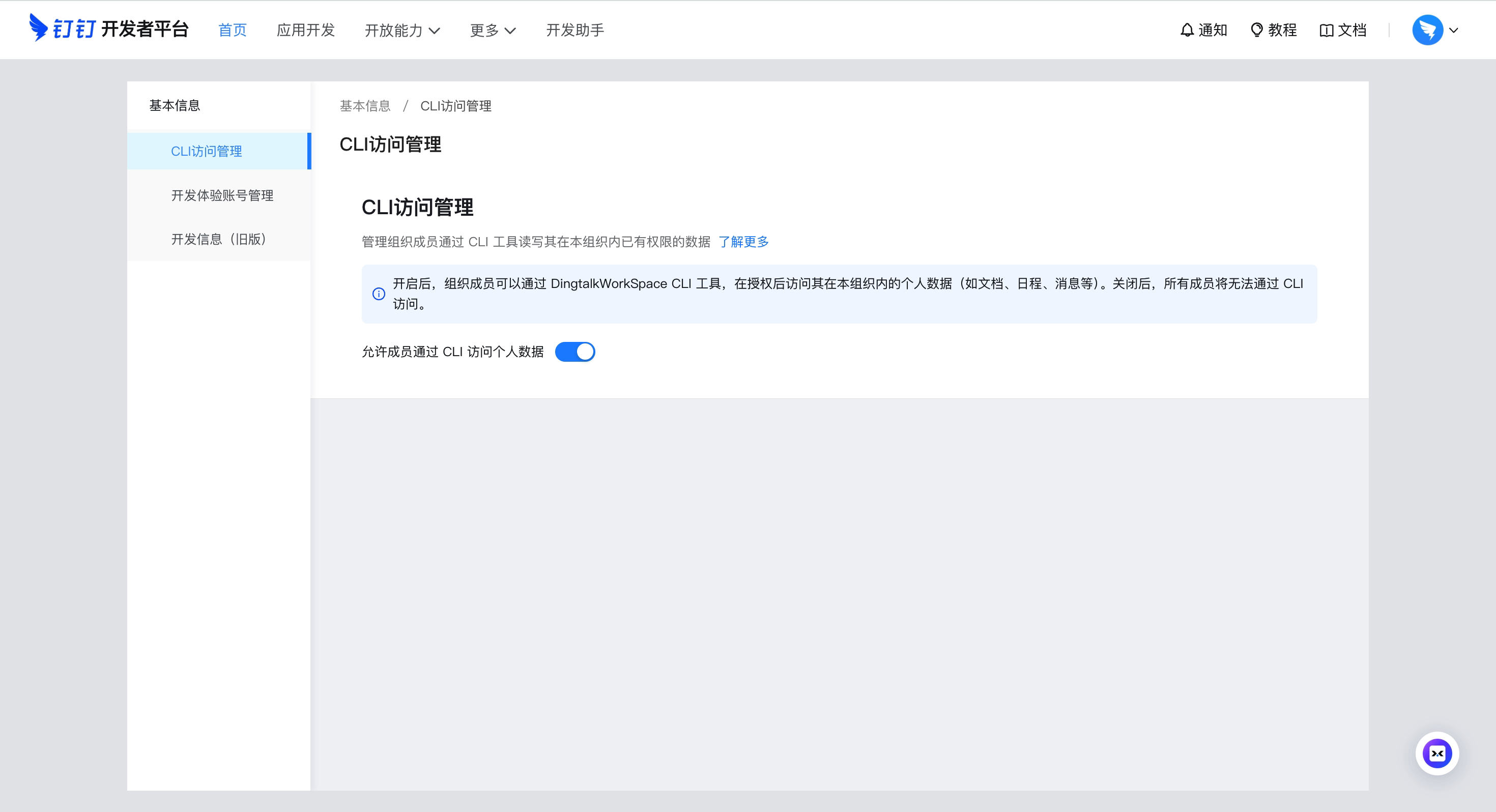
Admin: Enable CLI access for your organization
Go to Developer Platform → "CLI Access Management" → Enable.
Custom App mode (CI/CD, ISV integration)
For enterprise-managed scenarios, create your own DingTalk app:
- Open Platform Console → Create App
- Security Settings → Add redirect URLs:
http://127.0.0.1,https://login.dingtalk.com - Publish the app
- Login:
dws auth login --client-id <your-app-key> --client-secret <your-app-secret>
Credentials are securely persisted after first login (Keychain). Subsequent runs auto-refresh tokens.
Quick Start
dws contact user search --keyword "engineering"     # search contacts
dws calendar event list                            # list calendar events
dws todo task create --title "Quarterly report" --executors "<your-userId>"   # create a todo (replace <your-userId>)
dws todo task list --dry-run                       # preview without executing
Using with Agents
dws is designed as an AI-native CLI. Complete Installation and Getting Started first, then configure your agent:
Agent Invocation Patterns
# Use --yes to skip confirmation prompts (required for agents)
dws todo task create --title "Review PR" --executors "<your-userId>" --yes

# Use --dry-run to preview operations (safe execution)
dws contact user search --keyword "engineering" --dry-run

# Use --jq to extract precisely (save tokens)
dws contact user get-self --jq '.result[0].orgEmployeeModel | {name: .orgUserName, dept: .depts[0].deptName, userId}'
Schema Discovery
Agents don't need pre-built knowledge of every command. Use dws schema to dynamically discover capabilities:
# Step 1: Discover all available products
dws schema --jq '.products[] | {id, tool_count: (.tools | length)}'

# Step 2: Inspect target tool's parameter schema
dws schema aitable.query_records --jq '.tool.parameters'

# Step 3: Construct the correct call
dws aitable record query --base-id BASE_ID --table-id TABLE_ID --limit 10
Agent Skills
The repo ships a complete Agent Skill system (skills/). After installing, AI tools like Claude Code / Cursor can operate DingTalk directly through natural language:
# Install skills into current project
curl -fsSL https://raw.githubusercontent.com/DingTalk-Real-AI/dingtalk-workspace-cli/main/scripts/install-skills.sh | sh
install.shinstalls to$HOME/.agents/skills/dws(global);install-skills.shinstalls to./.agents/skills/dws(current project).
What's included:
| Component | Path | Description |
|---|---|---|
| Master Skill | SKILL.md |
Intent routing, decision tree, safety rules, error handling |
| Product references | references/products/*.md |
Per-product command reference (aitable, chat, calendar, etc.) |
| Intent guide | references/intent-guide.md |
Disambiguation for confusing scenarios (e.g. report vs todo) |
| Global reference | references/global-reference.md |
Auth, output formats, global flags |
| Error codes | references/error-codes.md |
Error codes + debugging workflows |
| Recovery guide | references/recovery-guide.md |
RECOVERY_EVENT_ID handling |
| Ready-made scripts | scripts/*.py |
13 batch operation scripts (see below) |
Ready-made scripts — 13 Python scripts for common multi-step workflows
| Script | Description |
|---|---|
calendar_schedule_meeting.py |
Create event + add participants + find & book available meeting room |
calendar_free_slot_finder.py |
Find common free slots across multiple people, recommend best meeting time |
calendar_today_agenda.py |
View today/tomorrow/this week's schedule |
import_records.py |
Batch import records from CSV/JSON into AITable |
bulk_add_fields.py |
Batch add fields to an AITable data table |
upload_attachment.py |
Upload attachment to AITable attachment field |
todo_batch_create.py |
Batch create todos from JSON (with priority, due date, executors) |
todo_daily_summary.py |
Summarize today/this week's incomplete todos |
todo_overdue_check.py |
Scan overdue todos and output overdue list |
contact_dept_members.py |
Search department by name and list all members |
attendance_my_record.py |
View my attendance records for today/this week/specific date |
attendance_team_shift.py |
Query team shift schedules and attendance statistics |
report_inbox_today.py |
View today's received reports with details |
ISV Integration: Author your own Agent Skills and orchestrate them with dws skills for cross-product workflows: ISV Skill → dws Skill → DingTalk Open Platform API (enforced auth + full audit).
Features
Smart Input Correction — auto-corrects common AI model parameter mistakes
Built-in pipeline engine that normalizes flag names, splits sticky arguments, and fuzzy-matches typos:
# Naming convention auto-conversion (camelCase / snake_case / UPPER -> kebab-case)
dws aitable record query --baseId BASE_ID --tableId TABLE_ID         # auto-corrected to --base-id --table-id

# Sticky argument splitting
dws contact user search --keyword "engineering" --timeout30           # auto-split to --timeout 30

# Fuzzy flag name matching
dws aitable record query --base-id BASE_ID --tabel-id TABLE_ID       # --tabel-id -> --table-id

# Value normalization (boolean / number / date / enum)
# "yes" -> true, "1,000" -> 1000, "2024/03/29" -> "2024-03-29", "ACTIVE" -> "active"
| Agent Output | dws Auto-Corrects To |
|---|---|
--userId |
--user-id |
--limit100 |
--limit 100 |
--tabel-id |
--table-id |
--USER-ID |
--user-id |
--user_name |
--user-name |
jq Filtering & Field Selection — fine-grained output control to reduce token consumption
# Built-in jq expressions
dws aitable record query --base-id BASE_ID --table-id TABLE_ID --jq '.invocation.params'
dws schema --jq '.products[] | {id, tools: (.tools | length)}'

# Return only specific fields
dws aitable record query --base-id BASE_ID --table-id TABLE_ID --fields invocation,response
Schema Introspection — query parameter schemas before making calls
dws schema                                              # list all products and tools
dws schema aitable.query_records                        # view parameter schema
dws schema aitable.query_records --jq '.tool.required'   # view required fields
dws schema --jq '.products[].id'                        # extract all product IDs
Pipe & File Input — read flag values from files or stdin
# Read message body from a file
dws chat message send-by-bot --robot-code BOT_CODE --group GROUP_ID \
  --title "Weekly Report" --text @report.md

# Pipe content via stdin
cat report.md | dws chat message send-by-bot --robot-code BOT_CODE --group GROUP_ID \
  --title "Weekly Report"

# Read from stdin explicitly
dws chat message send-by-bot --robot-code BOT_CODE --group GROUP_ID \
  --title "Weekly Report" --text @-
Key Services
| Service | Command | Commands | Subcommands | Description |
|---|---|---|---|---|
| Contact | contact |
6 | user dept |
Search users by name/mobile, batch query, departments, current user profile |
| Chat | chat |
10 | message group search |
Group CRUD, member management, bot messaging, webhook |
| Bot | chat bot |
6 | bot group message search |
Robot creation/search, group/single messaging, webhook, message recall |
| Calendar | calendar |
13 | event room participant busy |
Events CRUD, meeting room booking, free-busy query, participant management |
| Todo | todo |
6 | task |
Create, list, update, done, get detail, delete |
| Approval | oa |
9 | approval |
Approve/reject/revoke, pending tasks, initiated instances, process list |
| Attendance | attendance |
4 | record shift summary rules |
Clock-in records, shift schedules, attendance summary, group rules |
| Ding | ding |
2 | message |
Send/recall DING messages |
| Report | report |
7 | create list detail template stats sent |
Create reports, sent/received list, templates, statistics |
| AITable | aitable |
20 | base table record field attachment template |
Full CRUD for bases/tables/records/fields, templates |
| Workbench | workbench |
2 | app |
Batch query app details |
| DevDoc | devdoc |
1 | article |
Search platform docs and error codes |
86 commands across 12 products. Run
dws --helpfor the full list, ordws <service> --helpfor subcommands.
Coming soon
doc (documents) · mail (email) · minutes (AI transcription) · drive (cloud drive) · conference (video) · tb (Teambition) · aiapp (AI apps) · live (streaming) · skill (marketplace)
Security by Design
dws treats security as a first-class architectural concern, not an afterthought. Credentials never touch disk, tokens never leave trusted domains, permissions never exceed grants, operations never escape audit — every API call must pass through DingTalk Open Platform's authentication and audit chain, no exceptions.
For Developers
| Mechanism | Details |
|---|---|
| Encrypted token storage | PBKDF2 + AES-256-GCM encryption, keyed by device physical MAC address; cross-platform Keychain/DPAPI integration provides additional protection — tokens cannot be decrypted on another machine |
| Input security | Path traversal protection (symlink resolution + working directory containment), CRLF injection blocking, Unicode visual spoofing filtering — prevents AI Agents from being tricked by malicious instructions |
| Domain allowlist | DWS_TRUSTED_DOMAINS defaults to *.dingtalk.com; bearer tokens are never sent to non-allowlisted domains |
| HTTPS enforced | All requests require TLS; HTTP only permitted for loopback during development |
| Dry-run preview | --dry-run shows call parameters without executing, preventing accidental mutations |
| Zero credential persistence | Client ID / Secret used in memory only — never written to config files or logs |
For Enterprise Admins
| Mechanism | Details |
|---|---|
| OAuth device-flow auth | Users must authenticate through an admin-authorized DingTalk application |
| Least-privilege scoping | CLI can only invoke APIs granted to the application — no privilege escalation |
| Allowlist gating | Admin confirmation required during co-creation phase; self-service approval planned |
| Full-chain audit | Every data read/write passes through the DingTalk Open Platform API — enterprise admins can trace complete call logs in real time; no anomalous operation can hide |
For ISVs
| Mechanism | Details |
|---|---|
| Tenant data isolation | Operates under authorized app identity; cross-tenant access is impossible |
| Skill sandbox | Agent Skills are Markdown documents (SKILL.md) — prompt descriptions only, no arbitrary code execution |
| Zero blind spots | Every API call during ISV–dws skill orchestration is forced through DingTalk Open Platform authentication — full call chain is traceable with no bypass path |
Found a vulnerability? Report via GitHub Security Advisories. See SECURITY.md.
Reference & Docs
- Reference — environment variables, exit codes, output formats, shell completion
- Architecture — discovery-driven pipeline, IR, transport layer
- Changelog — release history and migration notes
Contributing
See CONTRIBUTING.md for build instructions, testing, and development workflow.
License
Apache-2.0