
DingTalk Workspace CLI (dws)
One CLI for all of DingTalk Workspace — built for humans and AI agents.
Access contacts, calendar, todos, attendance, AI tables and more with zero boilerplate, get structured JSON responses ready for automation, and leverage built-in Agent Skills for seamless AI integration.
Important
Co-creation Phase: This project accesses DingTalk enterprise data and requires enterprise admin authorization. We are currently in a gray-scale co-creation phase. Please join the DingTalk DWS co-creation group and provide the following materials to the official staff for whitelist configuration: ① Your DingTalk application's Client ID; ② Confirmation from the enterprise admin to enable access. Self-service approval by enterprise admins will be supported in the future.



Contents
- Why dws?
- Key Services
- Installation
- Getting Started
- Quick Start
- AI Agent Skills
- Advanced Usage
- Environment Variables
- Exit Codes
- Architecture
- Development
- Testing
- Changelog
- Security
- Contributing
Why dws?
For humans — stop writing raw API calls. dws gives you --help on every resource, --dry-run to preview requests, and structured output in table/JSON/raw formats.
For AI agents — every response is structured JSON. Pair it with the included agent skills and your LLM can manage DingTalk Workspace without custom tooling.
# Search for a contact
dws contact user search --keyword "Alice"

# Create a todo item
dws todo task create --title "Prepare quarterly report" --executors "<userId>"

# Preview an operation without executing
dws todo task list --dry-run

# JSON output for agent consumption
dws contact user search --keyword "Alice" -f json
Key Services
dws covers DingTalk products through a unified command surface:
| Service | Command | Description |
|---|---|---|
| Contact | contact |
Contacts / users / departments |
| Chat | chat |
Group management / members / bot messaging / webhook |
| Calendar | calendar |
Calendar events / meeting rooms / free-busy |
| Todo | todo |
Todo task management |
| Approval | approval |
Approval processes / forms / instances |
| Attendance | attendance |
Attendance / shifts / statistics |
| Ding | ding |
DING messages / send / recall |
| Report | report |
Report / template / statistics |
| AITable | aitable |
AI table operations |
| Workbench | workbench |
Workbench app query |
| DevDoc | devdoc |
Open platform docs search |
| Doc | doc |
Document operations (coming soon) |
mail |
Email management (coming soon) | |
| Minutes | minutes |
AI meeting transcription (coming soon) |
| Drive | drive |
Cloud drive / file storage (coming soon) |
| Conference | conference |
Video conferencing (coming soon) |
| Teambition | tb |
Project management (coming soon) |
| AI App | aiapp |
AI application management (coming soon) |
| Live | live |
Live streaming (coming soon) |
| Skill | skill |
Skill marketplace (coming soon) |
Run dws --help for the complete list, or dws <service> --help for service-specific commands.
Installation
One-line install (recommended)
macOS / Linux:
curl -fsSL https://raw.githubusercontent.com/DingTalk-Real-AI/dingtalk-workspace-cli/main/scripts/install.sh | sh
Windows (PowerShell):
irm https://raw.githubusercontent.com/DingTalk-Real-AI/dingtalk-workspace-cli/main/scripts/install.ps1 | iex
Auto-detects OS and architecture, downloads the pre-built binary from GitHub Releases, and installs Agent Skills to
~/.agents/skills/dws— no Go, Node.js, or other dependencies required. Most AI agents (Claude Code, Cursor, Windsurf, etc.) can discover skills from the.agents/skills/directory.
Tip
The binary is installed to
~/.local/binby default. Ifdwsis not found after installation, add it to your PATH:export PATH="$HOME/.local/bin:$PATH"Add this line to your
~/.bashrcor~/.zshrcto make it permanent.
Pre-built binary (manual)
Download the latest binary for your platform from GitHub Releases.
Build from source
git clone https://github.com/DingTalk-Real-AI/dingtalk-workspace-cli.git
cd dingtalk-workspace-cli
make build
./dws version
This builds the binary only. To also install agent skills into your home directory:
sh scripts/install.sh
This detects the local source checkout and installs both the binary and skills without downloading from GitHub.
Getting Started
Step 1: Create a DingTalk Application
Go to the Open Platform App Development Console. Under "Internal Enterprise Apps - DingTalk Apps", click Create App in the top right corner to create a new application.

Step 2: Configure Redirect URL
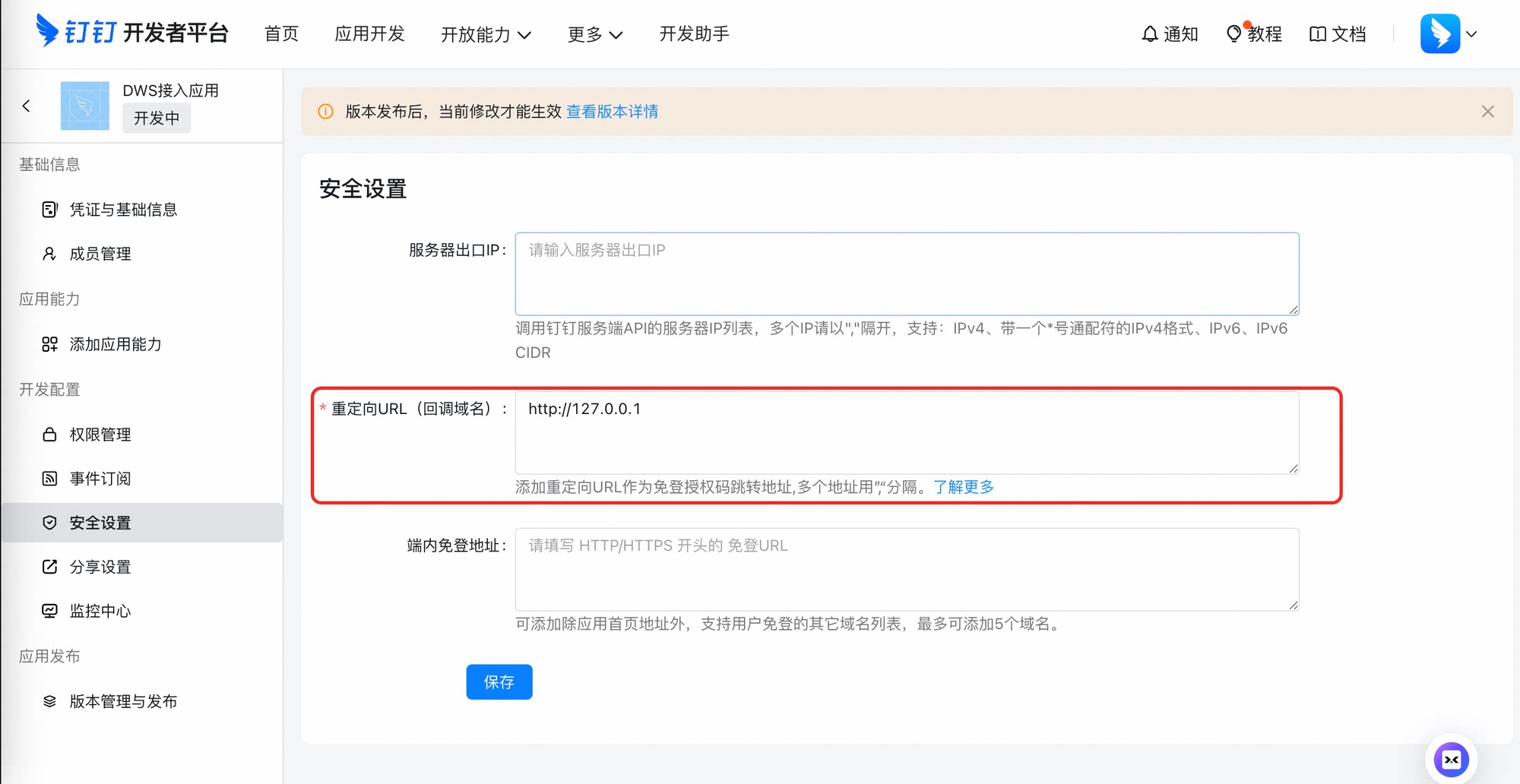
After creating the app, go into the app settings and click Security Settings. In the "Redirect URL (Callback Settings)" section, enter http://127.0.0.1 and save.
Step 3: Publish the Application
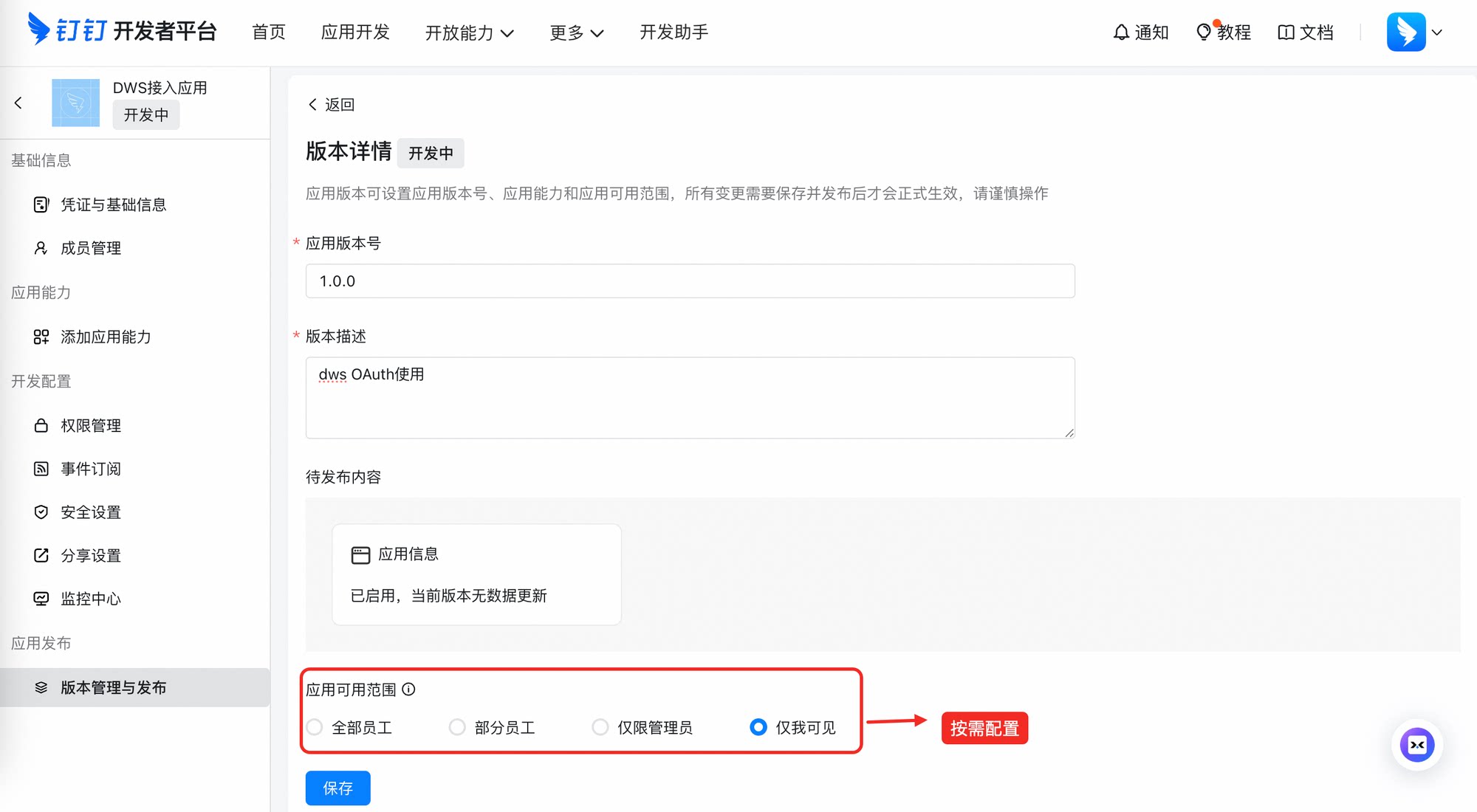
Click "App Release - Version Management & Release", publish a version to make the app go live.
Step 4: Request Whitelist Access
Refer to the Co-creation Phase notice at the top of this page to join the DingTalk DWS co-creation group and complete whitelist configuration.
Step 5: Login with Credentials
Once you have the AppKey and AppSecret, specify them via CLI flags:
dws auth login --client-id <your-app-key> --client-secret <your-app-secret>
Alternatively, set via environment variables:
export DWS_CLIENT_ID=<your-app-key>
export DWS_CLIENT_SECRET=<your-app-secret>
dws auth login
Note
CLI flags take precedence over environment variables. These credentials are used for the OAuth device flow authentication with DingTalk.
Token Encryption
Tokens are encrypted at rest using PBKDF2 (600,000 iterations) + AES-256-GCM, keyed by your device MAC address.
Quick Start
dws auth login                                    # authenticate with DingTalk
dws contact user search --keyword "Alice"           # search contacts
dws calendar event list                            # list calendar events
dws todo task create --title "Prepare quarterly report" --executors "<userId>"   # create a todo
AI Agent Skills
The repo ships agent skills (SKILL.md files) for every supported DingTalk product.
Skills are installed automatically by the Installation scripts. To install skills separately into an existing project:
# macOS / Linux — install only skills into the current project
curl -fsSL https://raw.githubusercontent.com/DingTalk-Real-AI/dingtalk-workspace-cli/main/scripts/install-skills.sh | sh
The one-line installer (install.sh) installs skills to ~/.agents/skills/dws (home directory).
Use install-skills.sh when you want to seed a specific project repository with ./.agents/skills/dws (current working directory).
Note
Home vs. project skills:
install.shplaces skills in$HOME/.agents/skills/dws.install-skills.shinstalls into the current working directory (./.agents/skills/dws), which is useful for seeding a specific project repository.
Advanced Usage
Output Formats
All commands support multiple output formats:
# Table (default, human-friendly)
dws contact user search --keyword "Alice" -f table

# JSON (for agents and piping)
dws contact user search --keyword "Alice" -f json

# Raw API response
dws contact user search --keyword "Alice" -f raw
Dry Run
Preview the MCP tool invocation without executing:
dws todo task list --dry-run
Output to File
dws contact user search --keyword "Alice" -o result.json
Shell Completion
# Bash
dws completion bash > /etc/bash_completion.d/dws

# Zsh
dws completion zsh > "${fpath[1]}/_dws"

# Fish
dws completion fish > ~/.config/fish/completions/dws.fish
Environment Variables
Common runtime and development overrides:
| Variable | Purpose |
|---|---|
DWS_CONFIG_DIR |
Overrides the default config directory |
DWS_SERVERS_URL |
Points discovery at a custom server registry endpoint |
DWS_CLIENT_ID |
OAuth client ID (DingTalk AppKey) |
DWS_CLIENT_SECRET |
OAuth client secret (DingTalk AppSecret) |
DWS_TRUSTED_DOMAINS |
Comma-separated list of trusted domains for bearer token injection (default: *.dingtalk.com). Set to * for development only |
DWS_ALLOW_HTTP_ENDPOINTS |
Set to 1 to allow HTTP (non-TLS) for loopback addresses during development |
Exit Codes
| Code | Category | Description |
|---|---|---|
| 0 | Success | Command completed successfully |
| 1 | API | MCP tool call or upstream API failure |
| 2 | Auth | Authentication or authorization failure |
| 3 | Validation | Invalid input, flags, or parameter schema mismatch |
| 4 | Discovery | Server discovery, cache, or protocol negotiation failure |
| 5 | Internal | Unexpected internal error |
When -f json is used, error responses include structured payloads with category, reason, hint, and optional actions fields for machine consumption.
Architecture
dws uses a discovery-driven pipeline — no product commands are hardcoded:
Market Registry ──► Discovery ──► IR (Canonical Catalog) ──► CLI (Cobra) ──► Transport (MCP JSON-RPC)
      │                 │
      ▼                 ▼
  mcp.dingtalk.com   Cache (TTL + stale fallback)
- Market — fetches the MCP server registry from
mcp.dingtalk.com - Discovery — resolves runtime server capabilities with disk cache and stale-fallback for offline resilience
- IR — normalizes servers into a canonical product/tool catalog
- CLI — mounts the catalog onto a Cobra command tree, maps flags to MCP input parameters
- Transport — executes MCP JSON-RPC calls with retries, auth injection, and response size limits
All output — success, errors, and metadata — is structured JSON when using -f json.
Development
make build                        # dev build
make test                         # unit tests
make lint                         # formatting + lint checks
make package                      # build all release artifacts locally (goreleaser snapshot)
make release                      # build and publish a release via goreleaser
make publish-homebrew-formula     # push dist/homebrew/dingtalk-workspace-cli.rb to a tap repo
Package Manager Artifacts
Build and verify local package-manager artifacts:
make package                                       # generates all platform archives, npm assets, Homebrew formulas
./scripts/release/verify-package-managers.sh        # verifies dws binary + skills are included
Testing
CLI Tests
Run the full CLI test suite (unit, golden, and integration tests):
bash test/scripts/run_all_tests.sh --jobs 8
Packaging Tests
Run packaging contract tests and local package-manager verification:
go test ./test/scripts/... -count=1
make package
./scripts/release/verify-package-managers.sh
Skill Tests
After installing the skills, use test/skill_tests.md to verify them. Feed the test prompts from that file to your AI agent and confirm the expected outputs.
Changelog
See CHANGELOG.md for release history and migration notes.
Security
To report a vulnerability, see SECURITY.md.
Contributing
See CONTRIBUTING.md for development workflow and local verification steps.
License
Apache-2.0