 e32fa1535c
* feat(auth): support multi-profile login

* fix(auth): complete multi-org profile acceptance

* feat(auth): 完成多组织 profile 验收

* docs(auth): 补充多组织 Ralph 验收材料

* feat(auth): 支持 auth switch TUI 切换 profile

* feat(auth): logout 默认清理所有组织

* feat(auth): login 默认新增组织授权

* feat(profile): 使用 profile switch 切换组织

* docs(ralph): 更新 profile switch 验收材料

* fix(profile): 展示全部可切换组织

* feat(profile): support multi-org switch tui

* chore(install): add branch source installer

* fix(profile): keep global profile out of tool params

* feat(profile): support csv multi-profile runtime

* ci: add multi-profile e2e workflow

* ci: run multi-profile e2e on all branches

* docs: document multi-profile e2e ci gate

* docs: remove multi-profile test cases from pr

* ci: harden multi-profile e2e gates

* fix(auth): serialize profiles.json RMW and harden multi-profile persistence

Wrap all profiles.json read-modify-write paths (profile switch/use/remove,
status marking, token save, logout) in the existing dual-layer lock via a new
withProfilesLock helper. Split each writer into a public (locking) entry point
plus a lock-free *Locked variant so the non-reentrant lock is never re-acquired;
the refresh path (oauth_helpers) and the load-path legacy migration now call the
lock-free saver to avoid self-deadlock.

Also: write profiles.json and the token marker via per-write random temp names
(uuid) to stop concurrent writers from corrupting a fixed .tmp file; quarantine
an unparseable profiles.json and rebuild an empty config so the CLI can
self-heal instead of locking out auth reset/logout; make DeleteAllTokenData
proceed even if profiles.json cannot be read; and stop SyncLegacyTokenMirror
from deleting the legacy mirror on a transient keychain read error.

* fix(auth): do not fall back to a different org's legacy token slot

When no explicit --profile is given, LoadTokenDataForProfile resolves the
current/primary profile and reads its per-corp keychain slot. If that slot
read failed, the code silently fell through to the legacy single token slot,
which after any drift between the legacy mirror and the current profile could
belong to a different organization. The command would then run as the wrong
org with no indication to the user.

Reproduction (conceptual):
  - profiles.json currentProfile = corpA
  - corpA's keychain slot is unreadable, legacy single slot still holds corpB
  - any read command (no --profile) silently used corpB's token

Fix: when a profile is resolved but its slot read fails and no --profile was
given, only fall back to the legacy single slot when its CorpID matches the
resolved profile (same org); otherwise return the original error instead of
acting as a different organization. The no-profile legacy path (pre-migration
installs with no resolved profile) is unchanged.

Tests:
  - Covered by the existing internal/auth suite under go test -race; the
    same-org fallback preserves the legacy-mirror case while the cross-org
    case now surfaces the read error.

* feat(skill): document multi-org profile usage and always ship dws-shared

The skills had no guidance on the multi-profile capability, so an agent would
treat the CLI as single-org: when a lookup missed in the current org it would
give up or ask the user instead of searching other logged-in orgs. The multi
skill set also referenced a `dws-shared` prerequisite that was never actually
installed, and the only multi-org hints lived inline in three product skills.

This adds, in source only:
- A "multi-org / profile" section in the mono SKILL.md (concept, commands,
  cross-org rule, aggregation, safety guardrails) plus a decision-tree entry,
  trigger conditions, and a corrected logout danger-table row (logout removes
  all orgs by default; removing the primary silently re-elects a new primary,
  confirm before removing the primary).
- A standalone skills/multi/dingtalk-profile skill mirroring the same content.
- A new skills/multi/dws-shared skill that carries auth, global flags and the
  multi-org rule, so every product skill's PREREQUISITE resolves and all
  read/search skills inherit the cross-org behavior without per-skill edits.
- Cross-org fallback notes on dingtalk-aisearch / chat / contact.

To guarantee the prerequisite actually ships, multi-mode install now force-
includes dws-shared even when --skill / --exclude narrows the set (no-op when
the source has no dws-shared, preserving older layouts).

Tests:
  - internal/app: TestP1SharedAlwaysIncludedWithSkillFilter installs with
    `-s aitable` and asserts dws-shared still lands in the destination;
    TestP1SharedNoopWhenAbsent guards the older-layout no-op.
  - go test -race ./internal/auth/... ./internal/app/... passes.

---------

Co-authored-by: shangguanxuan.sgx <shangguanxuan.sgx@alibaba-inc.com>
Co-authored-by: qinze <audanye@gmail.com>
DingTalk Workspace CLI (dws)
dws — DingTalk Workspace on the command line, built for humans and AI agents.




中文版 · English · Reference · Changelog
Important
Co-creation Phase: This project accesses DingTalk enterprise data and requires enterprise admin authorization. Join the DingTalk DWS co-creation group for support and updates. See Getting Started below.

Table of Contents
Why dws?
- For humans —
--helpfor usage,--dry-runto preview requests,-f table/json/rawfor output formats. - For AI agents — structured JSON responses + built-in Agent Skills, ready out of the box.
- For enterprise admins — zero-trust architecture: OAuth device-flow auth + domain allowlisting + least-privilege scoping. Not a single byte can bypass authentication and audit.
Installation
macOS / Linux:
curl -fsSL https://raw.githubusercontent.com/DingTalk-Real-AI/dingtalk-workspace-cli/main/scripts/install.sh | sh
Windows (PowerShell):
irm https://raw.githubusercontent.com/DingTalk-Real-AI/dingtalk-workspace-cli/main/scripts/install.ps1 | iex
Skill mode: mono vs multi
The installer ships skills in one of two layouts. CLI commands (dws aitable ..., dws calendar ...) are identical in both modes — only the agent-side skill layout differs.
| Mode | What gets installed | Best for |
|---|---|---|
| mono (stable, default) | One dws skill covering all products |
Cross-product workflows; single entry point |
| multi 🧪 EXPERIMENTAL | 18 per-product skills (dingtalk-aitable, dingtalk-calendar, dingtalk-chat, ...) |
Single-product tasks; smaller context per call |
🧪
multiis currently EXPERIMENTAL / preview. 18 product-scoped skills all pass the dispatch verifier, but interface, naming and cross-skill references may change in future releases. For production / shared environments, prefermono. File issues if you hit problems.
How to pick:
- Quick install (one-liner above): non-interactive, installs
mono. - TTY install (download then run):
curl -O .../install.sh && bash install.sh— prompts1) mono 2) multi(default 1). - Override via env:
DWS_SKILL_MODE=multi curl -fsSL ... | sh. - Switch later:
dws skill setup --mode multi(or--mode mono) — re-run any time.
Other install methods
npm (requires Node.js (npm/npx)):
npm install -g dingtalk-workspace-cli
Pre-built binary: download from GitHub Releases.
macOS users: If you see "cannot be opened because Apple cannot check it for malicious software", run:
xattr -d com.apple.quarantine /path/to/dws
Build from source:
git clone https://github.com/DingTalk-Real-AI/dingtalk-workspace-cli.git
cd dingtalk-workspace-cli
go build -o dws ./cmd       # build to current directory
cp dws ~/.local/bin/         # install to PATH
Requires Go 1.25+. Use
make packageto cross-compile for all platforms (macOS / Linux / Windows x amd64 / arm64).
China mirror
For users in mainland China, the following channels avoid GitHub network issues. By default (without setting these environment variables) the installer pulls from GitHub.
1. Install script + pre-built binary (Gitee mirror):
Repository mirror: https://gitee.com/DingTalk-Real-AI/dingtalk-workspace-cli
DWS_GITEE_REPO=DingTalk-Real-AI/dingtalk-workspace-cli curl -fsSL https://gitee.com/DingTalk-Real-AI/dingtalk-workspace-cli/raw/main/scripts/install.sh | sh
With
DWS_GITEE_REPOset, the installer resolves the latest version and every release asset (binary, checksums, skills) from the Gitee API instead of GitHub. If it is unset, installation defaults to GitHub.
2. npm package (npmmirror mirror):
npm install -g dingtalk-workspace-cli --registry=https://registry.npmmirror.com
npmmirror automatically syncs public packages from the public npm registry, so this works directly in China.
3. Skills only (Gitee mirror):
DWS_GITEE_REPO=DingTalk-Real-AI/dingtalk-workspace-cli curl -fsSL https://gitee.com/DingTalk-Real-AI/dingtalk-workspace-cli/raw/main/scripts/install-skills.sh | sh
With
DWS_GITEE_REPOset,install-skills.shresolves the version and skills package from Gitee; it also auto-falls back to the Gitee mirror when GitHub is unreachable.
Upgrade
Requires v1.0.7 or later. For earlier versions, please re-run the install script to upgrade.
dws has built-in self-upgrade capability. Updates are pulled directly from GitHub Releases with SHA256 integrity verification and automatic backup.
dws upgrade                    # interactive upgrade to latest version
dws upgrade --check            # check for new versions without installing
dws upgrade --list             # list all available versions
dws upgrade --version v1.0.7   # upgrade to a specific version
dws upgrade --rollback         # rollback to the previous version
dws upgrade -y                 # skip confirmation prompt
How it works
The upgrade process follows a two-phase atomic flow to ensure consistency:
- Prepare — downloads the platform-specific binary and skill packages to a temporary directory, verifies SHA256 checksums, and extracts/validates all files. If any step fails, the upgrade aborts without modifying the existing installation.
- Apply — only after all preparations succeed, the binary is replaced and skill packages are installed to all detected agent directories (
~/.agents/skills/dws,~/.claude/skills/dws,~/.cursor/skills/dws, etc.).
A backup of the current version is automatically created before each upgrade. Use dws upgrade --rollback to restore the previous version if needed.
| Flag | Description |
|---|---|
--check |
Check for updates without installing |
--list |
List all available versions with changelogs |
--version |
Upgrade to a specific version (e.g. v1.0.7) |
--rollback |
Rollback to the previous backed-up version |
--force |
Force reinstall even if already on the latest version |
--skip-skills |
Skip skill package update |
-y |
Skip confirmation prompt |
Getting Started
dws auth login            # browser opens automatically
dws auth login --device   # for headless environments (Docker, SSH, CI)
Select your organization and authorize. That's it.
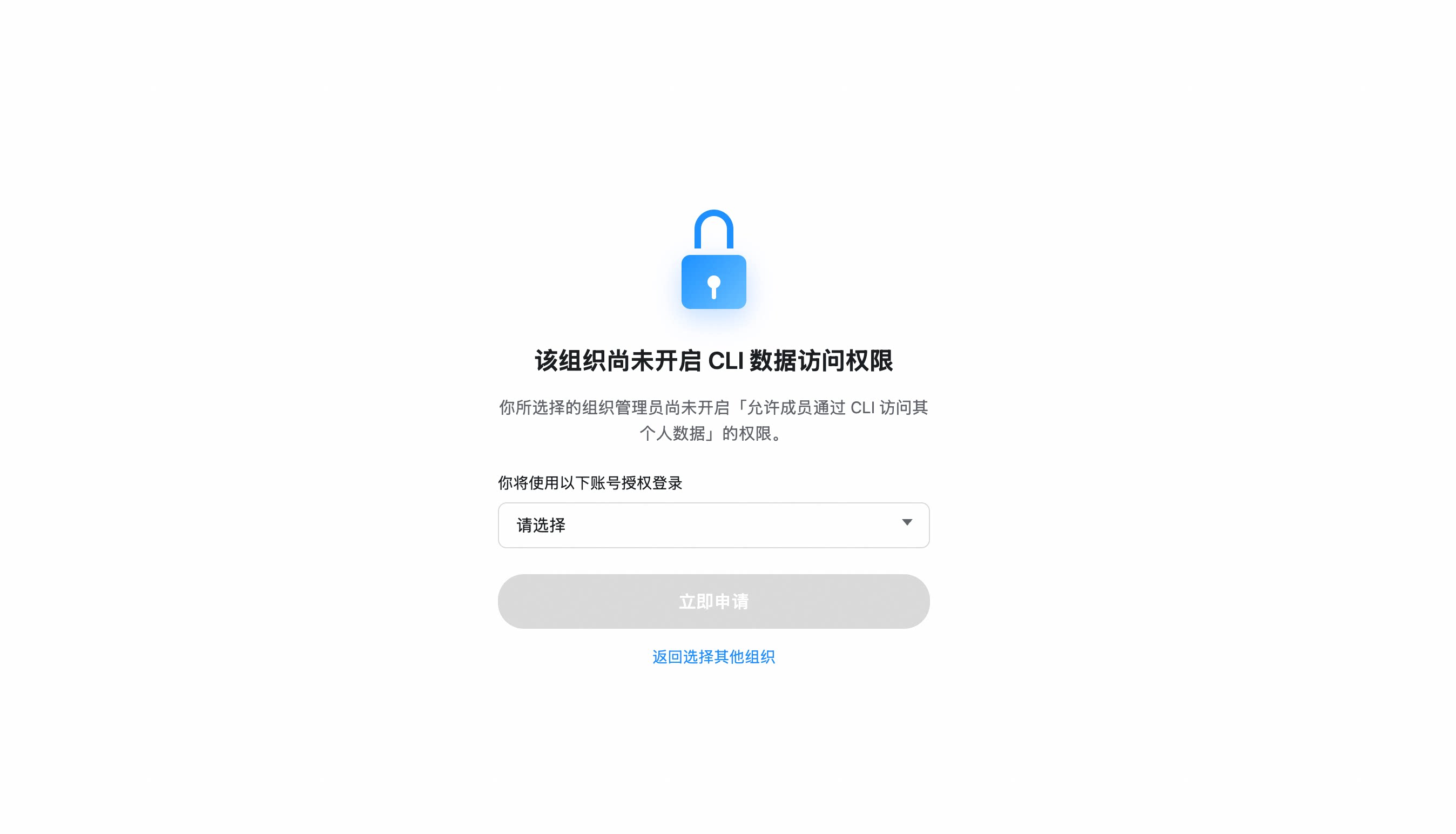
If your organization hasn't enabled CLI access, you'll be prompted to send an access request to your admin. Once approved, re-run
dws auth login.
Organization hasn't enabled CLI access?
- After selecting your organization, click "Apply Now" to notify the admin
- The admin receives a request card and can approve with one click
- Once approved, re-run
dws auth login
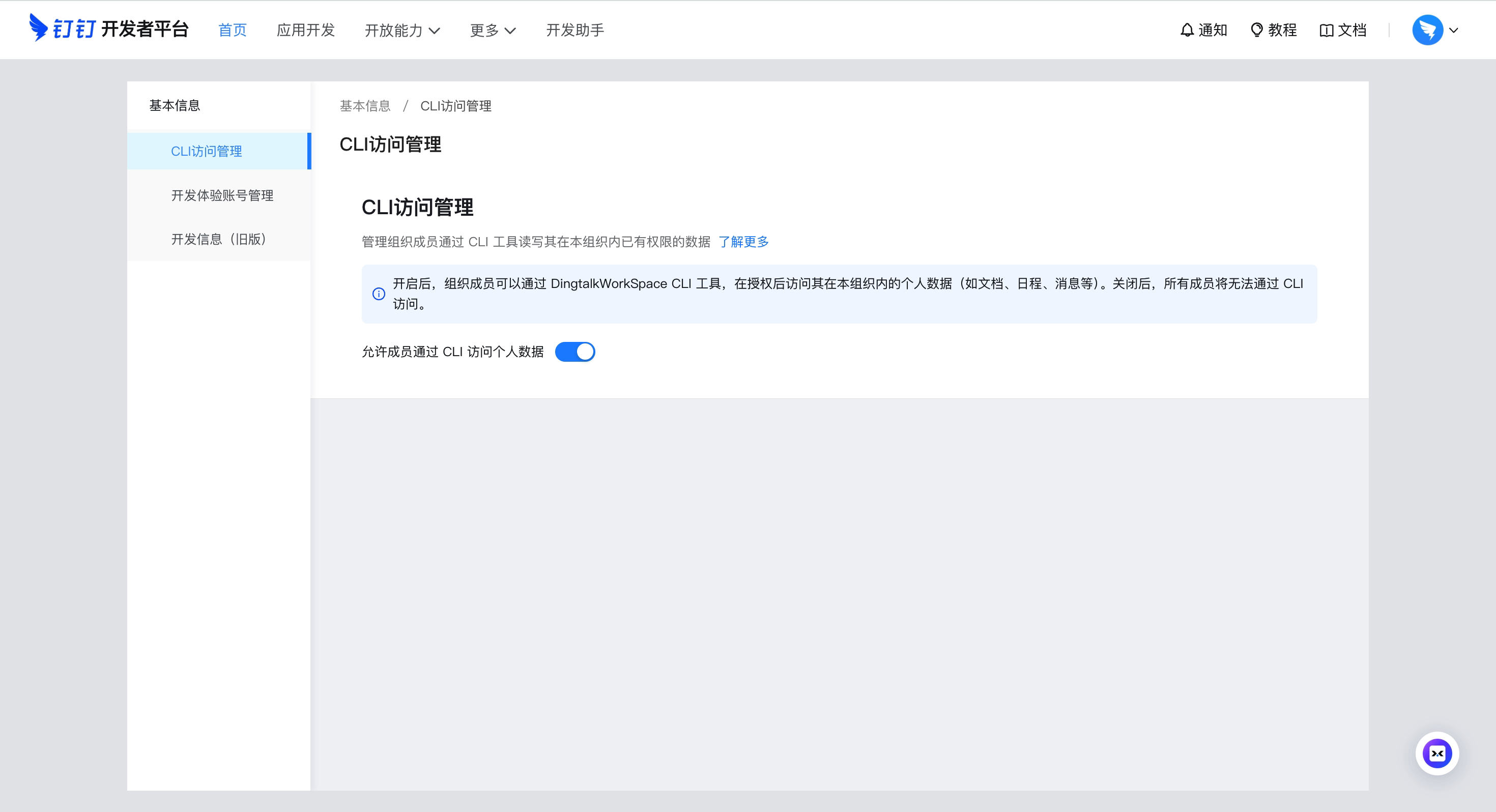
Admin: Enable CLI access for your organization
Go to Developer Platform → "CLI Access Management" → Enable.
Custom App mode (CI/CD, ISV integration)
For enterprise-managed scenarios, create your own DingTalk app:
- Open Platform Console → Create App
- Security Settings → Add redirect URLs:
http://127.0.0.1,https://login.dingtalk.com - Publish the app
- Login:
dws auth login --client-id <your-app-key> --client-secret <your-app-secret>
Credentials are securely persisted after first login (Keychain). Subsequent runs auto-refresh tokens.
Migrate auth between Linux sandboxes
Copying only ~/.dws/app.json does not carry the refresh token; access tokens expire after ~2 hours. Use the official export/import flow:
# Sandbox A (already logged in)
dws auth export -o /tmp/dws-auth.tar.gz
# Or for copy/paste: dws auth export --base64 -o /tmp/dws-auth.b64

# Sandbox B
dws auth import -i /tmp/dws-auth.tar.gz
# Or: dws auth import -i /tmp/dws-auth.b64 --base64
dws auth status   # confirm "Refresh Token: valid"
The bundle includes the encrypted keychain under ~/.local/share/dws-cli (with auth-token.enc and dek) plus required ~/.dws config files.
Quick Start
dws contact user search --query "engineering"      # search contacts
dws calendar event list                            # list today's calendar events
dws doc search --query "quarterly"                 # search DingTalk Docs
dws minutes list mine                              # list AI meeting notes I created
dws drive list                                     # list DingTalk drive files
dws todo task create --title "Quarterly report" --executors "<your-userId>"   # create a todo (replace <your-userId>)
dws todo task list --dry-run                       # preview without executing
Full command list:
docs/command-index.md— all commands with descriptions and when-to-use guidance.
Using with Agents
dws is designed as an AI-native CLI. Complete Installation and Getting Started first, then configure your agent:
Agent Invocation Patterns
# Use --yes to skip confirmation prompts (required for agents)
dws todo task create --title "Review PR" --executors "<your-userId>" --yes

# Use --dry-run to preview operations (safe execution)
dws contact user search --query "engineering" --dry-run

# Use --jq to extract precisely (save tokens)
dws contact user get-self --jq '.result[0].orgEmployeeModel | {name: .orgUserName, dept: .depts[0].deptName, userId}'
Schema Discovery
Agents don't need pre-built knowledge of every command. Use dws schema to dynamically discover capabilities:
# Step 1: Discover all available products
dws schema --jq '.products[] | {id, tool_count: (.tools | length)}'

# Step 2: Inspect target tool's parameter schema
dws schema aitable.query_records --jq '.tool.parameters'

# Optional: inspect DingTalk authorization metadata for PAT planning
dws schema aitable.query_records --jq '.tool.auth'

# Step 3: Construct the correct call
dws aitable record query --base-id BASE_ID --table-id TABLE_ID --limit 10
Agent Skills
The repo ships a complete Agent Skill system under skills/, now organized into two layouts:
skills/mono/— single-skill layout (oneSKILL.md+references/products/), recommended default.skills/multi/— per-product skills (dingtalk-aitable/,dingtalk-calendar/,dingtalk-chat/, ... 20 products in total), each with its ownSKILL.md. 🧪 EXPERIMENTAL / preview — see banner in each multiSKILL.mdfor caveats.
After installing, AI tools like Claude Code / Cursor can operate DingTalk directly through natural language:
# Install skills into current project (defaults to mono)
curl -fsSL https://raw.githubusercontent.com/DingTalk-Real-AI/dingtalk-workspace-cli/main/scripts/install-skills.sh | sh
install.shinstalls to$HOME/.agents/skills/dws(global);install-skills.shinstalls to./.agents/skills/dws(current project).China users: prefix
DWS_GITEE_REPOto use the Gitee mirror — see China mirror.
Switching or re-installing with dws skill setup:
# Interactive: prompts for mode + target agents
dws skill setup

# Install mono skill to every detected agent home (claude / cursor / codex / opencode / qoder)
dws skill setup --mode mono --target all --yes

# Install multi skills to a single agent home
dws skill setup --mode multi --target cursor --yes

# Point at a local source tree (e.g. a fork or work-in-progress)
DWS_SKILL_SOURCE=/path/to/skills dws skill setup --mode multi
| Flag | Values | Description |
|---|---|---|
--mode |
mono | multi |
Skill layout; defaults to interactive prompt |
--target |
all | claude | cursor | codex | opencode | qoder |
Where to install; all covers every detected agent home |
--source |
path | Local source directory (overrides bundled skills) |
--yes |
— | Skip confirmation prompts |
Env vars: DWS_SKILL_MODE=mono|multi (also honored by install.sh / install.ps1), DWS_SKILL_SOURCE=<path>.
What's included (mono layout):
| Component | Path | Description |
|---|---|---|
| Master Skill | skills/mono/SKILL.md |
Intent routing, decision tree, safety rules, error handling |
| Product references | skills/mono/references/products/*.md |
Per-product command reference (aitable, chat, calendar, etc.) |
| Intent guide | skills/mono/references/intent-guide.md |
Disambiguation for confusing scenarios (e.g. report vs todo) |
| Global reference | skills/mono/references/global-reference.md |
Auth, output formats, global flags |
| Error codes | skills/mono/references/error-codes.md |
Error codes + debugging workflows |
| Recovery guide | skills/mono/references/recovery-guide.md |
RECOVERY_EVENT_ID handling |
| Ready-made scripts | skills/mono/scripts/*.py |
13 batch operation scripts (see below) |
Ready-made scripts — 13 Python scripts for common multi-step workflows
| Script | Description |
|---|---|
calendar_schedule_meeting.py |
Create event + add participants + find & book available meeting room |
calendar_free_slot_finder.py |
Find common free slots across multiple people, recommend best meeting time |
calendar_today_agenda.py |
View today/tomorrow/this week's schedule |
import_records.py |
Batch import records from CSV/JSON into AITable |
bulk_add_fields.py |
Batch add fields to an AITable data table |
upload_attachment.py |
Upload attachment to AITable attachment field |
todo_batch_create.py |
Batch create todos from JSON (with priority, due date, executors) |
todo_daily_summary.py |
Summarize today/this week's incomplete todos |
todo_overdue_check.py |
Scan overdue todos and output overdue list |
contact_dept_members.py |
Search department by name and list all members |
attendance_my_record.py |
View my attendance records for today/this week/specific date |
attendance_team_shift.py |
Query team shift schedules and attendance statistics |
report_inbox_today.py |
View today's received reports with details |
ISV Integration: Author your own Agent Skills and orchestrate them with dws skills for cross-product workflows: ISV Skill → dws Skill → DingTalk Open Platform API (enforced auth + full audit).
Features
Raw API Access — call any DingTalk OpenAPI directly
dws api lets you call any DingTalk OpenAPI without an SDK. Tokens are automatically acquired and refreshed.
Prerequisite: Must login with your own app credentials (see Custom App mode). Encrypted tokens from MCP default-credential login are not supported for raw API calls.
# Login (first time only)
dws auth login --client-id <APP_KEY> --client-secret <APP_SECRET>

# === api.dingtalk.com ===

# List all enterprise apps
dws api GET /v1.0/microApp/allApps

# Search users (POST + JSON body)
dws api POST /v1.0/contact/users/search \
  --data '{"queryWord":"engineering","offset":0,"size":10}'

# === oapi.dingtalk.com ===

# Get user details (use --base-url to specify domain)
dws api POST /topapi/v2/user/get \
  --base-url https://oapi.dingtalk.com \
  --data '{"userid":"<USER_ID>"}'

# Or use the full URL directly
dws api POST https://oapi.dingtalk.com/topapi/v2/user/get \
  --data '{"userid":"<USER_ID>"}'

# === General ===
dws api GET /v1.0/microApp/allApps --page-all   # auto-paginate
dws api GET /v1.0/microApp/allApps --dry-run     # preview request
dws api GET /v1.0/microApp/allApps --jq '.agentId'  # jq filtering
| Feature | Details |
|---|---|
| Dual-form auto-detection | Automatically selects api.dingtalk.com (header auth) or oapi.dingtalk.com (query-param auth) based on URL |
| Automatic token management | App-level accessToken is fetched on first call, cached while valid, auto-refreshed on expiry |
| Domain allowlist | Only api.dingtalk.com and oapi.dingtalk.com permitted — prevents token leakage |
| Auto-pagination | --page-all iterates all pages. --page-limit caps the maximum (default 10, set to 0 for unlimited, hard cap at 500 to prevent infinite loops) |
Smart Input Correction — auto-corrects common AI model parameter mistakes
Built-in pipeline engine that normalizes flag names, splits sticky arguments, and fuzzy-matches typos:
# Naming convention auto-conversion (camelCase / snake_case / UPPER -> kebab-case)
dws aitable record query --baseId BASE_ID --tableId TABLE_ID         # auto-corrected to --base-id --table-id

# Sticky argument splitting
dws contact user search --query "engineering" --timeout30           # auto-split to --timeout 30

# Fuzzy flag name matching
dws aitable record query --base-id BASE_ID --tabel-id TABLE_ID       # --tabel-id -> --table-id

# Value normalization (boolean / number / date / enum)
# "yes" -> true, "1,000" -> 1000, "2024/03/29" -> "2024-03-29", "ACTIVE" -> "active"
| Agent Output | dws Auto-Corrects To |
|---|---|
--userId |
--user-id |
--limit100 |
--limit 100 |
--tabel-id |
--table-id |
--USER-ID |
--user-id |
--user_name |
--user-name |
jq Filtering & Field Selection — fine-grained output control to reduce token consumption
# Built-in jq expressions
dws aitable record query --base-id BASE_ID --table-id TABLE_ID --jq '.invocation.params'
dws schema --jq '.products[] | {id, tools: (.tools | length)}'

# Return only specific fields
dws aitable record query --base-id BASE_ID --table-id TABLE_ID --fields invocation,response
Schema Introspection — query parameter schemas before making calls
dws schema                                              # list all products and tools
dws schema aitable.query_records                        # view parameter schema
dws schema aitable.query_records --jq '.tool.required'   # view required fields
dws schema aitable.query_records --jq '.tool.auth'       # view authorization metadata
dws schema --jq '.products[].id'                        # extract all product IDs
Pipe & File Input — read flag values from files or stdin
# Read message body from a file
dws chat message send-by-bot --robot-code BOT_CODE --group GROUP_ID \
  --title "Weekly Report" --text @report.md

# Pipe content via stdin
cat report.md | dws chat message send-by-bot --robot-code BOT_CODE --group GROUP_ID \
  --title "Weekly Report"

# Read from stdin explicitly
dws chat message send-by-bot --robot-code BOT_CODE --group GROUP_ID \
  --title "Weekly Report" --text @-
Note
:
@is treated as the@<path>file-injection prefix only when the next character is an ASCII path-shaped character (A-Z/a-z/0-9/.///~/_/-), or@-for stdin. Chat-bot payloads like--text "@所有人 周报"or--text "@张三 看一下"pass through unchanged, so literal mentions reach the API as-is.
DingTalk bot — connect a robot to your local AI
dws dev connect bridges a DingTalk robot to a local AI CLI (Claude Code / Codex / opencode / Qoder / Gemini, or any tool via --agent-cmd): @-mention the bot in a chat and it answers using your local agent, keeping per-conversation multi-turn memory.
dws dev connect --channel auto --robot-client-id <id> --robot-client-secret <secret>
In-chat session commands (send the bare command as the whole message — no agent turn, no tokens):
| Command | Effect |
|---|---|
/new (aliases /start, /reset) |
Start a fresh session; the previous one is left intact (resumable where the agent supports it) |
/clear |
Wipe the current session — disposed through the agent's real session op (opencode issues DELETE /session/:id); channels whose agent exposes no delete primitive fall back to a reset |
See docs/robot-quickstart.md for the full 4-step walkthrough (install → create robot → connect → add to a group).
Key Services
| Service | Command | Commands | Subcommands | Description |
|---|---|---|---|---|
| Contact | contact |
15 | user dept label relation |
Search users by name / mobile / job-number, batch query, departments, labels & roles, person relations, roster profile & dismissions, current user |
| Chat / IM | chat (alias im) |
65 | message group bot conversation-info search search-common list-top-conversations group-mute group-mute-member mute set-top list-categories list-conversations |
Messages (send / reply / list / list-all / by-sender / mentions / focused / unread / topic replies / search / advanced search / forward / cards / emoji & text-emotion reactions / recall / read & send status queries), group CRUD + member management (members add / remove / list / add-bot, member-role CRUD, invite URL, icon, settings, transfer-owner, set-admin, quit), bot-identity messaging (send-by-bot / recall-by-bot / send-by-webhook), conversation info, common-groups lookup, group/member/conversation mute, conversation set-top, conversation categories |
| Calendar | calendar |
23 | event book acl attendee participant room busy attachment |
Events CRUD + suggested times + attachments, calendar books (get / search / primary via --id primary), access-control list, attendee management (wukong-aligned naming, --calendar-id aware), meeting room booking, free-busy query |
| Todo | todo |
16 | task comment |
Create / list / update / done / get / delete tasks, plus task comments |
| Approval | oa |
15 | approval |
Approve / reject / revoke / redirect tasks, pending / initiated / submitted / executed / cc instances, process forms, comments, operation records |
| Attendance | attendance |
4 | record shift summary rules |
Clock-in records, shift schedules, attendance summary, group rules |
| Ding | ding |
2 | message |
Send / recall DING messages |
| Report | report |
20 | create submit list detail template stats inbox outbox entry |
Create / submit reports, sent & received (inbox / outbox) lists, templates (get / list), statistics, single-entry get |
| AI Tables | aitable |
102 | base table record field view section advperm workflow dashboard chart import export attachment template form |
Full CRUD for Bases / datasheets / records / fields / views; node (section) management, advanced permission & roles, automation workflows; record upsert / share-url / history / primary-doc; view lock / duplicate / frozen-cols / row-height / fill-color-rule / card / timebar; charts & dashboards; import/export; attachments; forms; templates |
| Doc | doc |
29 | search list info read create update upload download copy move rename file folder block comment permission media |
Search / read / write docs, file & folder create, block-level editing, comments (list / create / reply / create-inline), permission management, media, upload / download |
| Drive | drive |
17 | list list-spaces info download mkdir upload upload-info commit delete copy move rename search permission |
DingTalk drive file ops: list / search / info / download, create folders, upload (one-shot or two-phase), copy / move / rename, permission management (list / mutation / remove), doc-transfer, delete |
| Minutes | minutes |
31 | list get tag update mind-graph speaker permission hot-word record upload replace-text |
List AI meeting notes (mine / shared / all), tags (list / query by tag), details (info / summary / keywords / transcription / todos / batch), title/summary updates, mind map, speaker, member permission, hot-word, recording control, upload session |
mail |
33 | mailbox message send draft folder template contact tag thread attachment user |
List mailboxes, KQL search + folder-scoped message list, read & send messages, drafts, folder CRUD, message templates (CRUD), mail contacts (CRUD), tags, threads, attachments, address-book user search | |
| Sheet | sheet |
60 | range filter filter-view cond-format (+ dimension, float-image, dropdown, csv, merge, find/replace, write-image, …) |
Online spreadsheet (contentType=ALIDOC, extension=axls): worksheet CRUD, range read / write / copy / fill / sort / style, dimension ops, filters & filter views, conditional formatting, float images, dropdowns, CSV get/put, cell merge / unmerge, find / replace, image write |
| Wiki | wiki |
27 | space member node doc file |
Knowledge base management: spaces (create / get / list / search / delete), members (add / list / update / remove), node tree (create / delete / list / search / move / copy / transfer), docs & files |
| DevDoc | devdoc |
2 | article error |
Search the DingTalk Open Platform documentation and diagnose API errors |
| AI Search | aisearch |
3 | person |
Enterprise people search by name / department / position / duty / supervisor / subordinate / phone / job-number (single command, multi-dimension filter) |
| Live | live |
1 | stream |
DingTalk live streaming: list my lives |
| Raw API | api |
1 | — | Call any DingTalk OpenAPI directly (api / oapi dual-form), with automatic app-level token management |
466 commands across 18 products (after the dws-wukong alignment in 1.0.43). Full listing with descriptions and usage scenarios:
docs/command-index.md. Rundws --helpfor the top-level tree, ordws <service> --helpfor subcommands.
Note on
chat bot: bot capabilities (send-by-bot/recall-by-bot/add-bot/send-by-webhook/ bot search) are merged into the relevantchatsubtrees (e.g.dws chat message send-by-bot,dws chat group members add-bot) so the agent-facing command surface stays flat and discoverable. There is no longer a separate top-levelbotproduct.
Coming soon
conference(video meetings)- Multi-skill mode (experimental) — per-product skills under
skills/multi/; opt in viadws skill setup --mode multi
Security by Design
dws treats security as a first-class architectural concern, not an afterthought. Credentials never touch disk, tokens never leave trusted domains, permissions never exceed grants, operations never escape audit — every API call must pass through DingTalk Open Platform's authentication and audit chain, no exceptions.
For Developers
| Mechanism | Details |
|---|---|
| Encrypted token storage | PBKDF2 + AES-256-GCM encryption, keyed by device physical MAC address; cross-platform Keychain/DPAPI integration provides additional protection — tokens cannot be decrypted on another machine |
| Input security | Path traversal protection (symlink resolution + working directory containment), CRLF injection blocking, Unicode visual spoofing filtering — prevents AI Agents from being tricked by malicious instructions |
| Domain allowlist | DWS_TRUSTED_DOMAINS defaults to *.dingtalk.com; bearer tokens are never sent to non-allowlisted domains |
| HTTPS enforced | All requests require TLS; HTTP only permitted for loopback during development |
| Dry-run preview | --dry-run shows call parameters without executing, preventing accidental mutations |
| Zero credential persistence | Client ID / Secret used in memory only — never written to config files or logs |
For Enterprise Admins
| Mechanism | Details |
|---|---|
| OAuth device-flow auth | Users must authenticate through an admin-authorized DingTalk application |
| Least-privilege scoping | CLI can only invoke APIs granted to the application — no privilege escalation |
| Allowlist gating | Admin confirmation required during co-creation phase; self-service approval planned |
| Full-chain audit | Every data read/write passes through the DingTalk Open Platform API — enterprise admins can trace complete call logs in real time; no anomalous operation can hide |
For ISVs
| Mechanism | Details |
|---|---|
| Tenant data isolation | Operates under authorized app identity; cross-tenant access is impossible |
| Skill sandbox | Agent Skills are Markdown documents (SKILL.md) — prompt descriptions only, no arbitrary code execution |
| Zero blind spots | Every API call during ISV–dws skill orchestration is forced through DingTalk Open Platform authentication — full call chain is traceable with no bypass path |
Found a vulnerability? Report via GitHub Security Advisories. See SECURITY.md.
Reference & Docs
- Command Index — every runtime command with description and when-to-use guidance
- Reference — environment variables, exit codes, output formats, shell completion
- Architecture — discovery-driven pipeline, IR, transport layer
- Open Platform App Command Routing — yulan dev app command design, MCP overlay, permission flow, and Agent routing
- Changelog — release history and migration notes
Contributing
See CONTRIBUTING.md for build instructions, testing, and development workflow.
License
Apache-2.0